One research report for BlueLiteBlocker. Reports come with Plus, Pro and Max.
Takeaway & demandCited takeaway and search volumes
Traffic & domainPopularity rank, visits and authority
Money & pricingPlans and prices from the maker’s site
ReviewsComplaints and praise, quoted
Competitors & ranksRank against the closest listings
Build opportunityWhat to build and how to position it
Every number shows its source and date
Ready in a minute or two
Report and PDF yours for 30 days
Reviews
Tom Barrister2.1 years ago
Currently, this extension does not work as-is, due to the domain updating from twitter.com to x.com, BUT there is a way to make it work, via a fixed extension from GitHub.
See the review by boopidoop for full instructions. Before following the guide, I recommend that you remove the current BlueLiteBlocker extension, as it's not needed for the new extension to work, and since the two icons can easily be confused, making it hard to know (at that point) which one to remove.
Then follow the instructions to install the fixed extension.
S Lbt2.3 years ago
Useless for a while now, since it does not work on the "x.com" URLs.
Took me 5min to update the app locally, it's a damn shame devs won't do the same, despite people asking for it on the git page.
boopidoop2.3 years ago
Very good extension, but doesn't currently work due to the recent URL change ("twitter.com" -> "x.com")
There's currently a GitHub pull request that fixes this, requires manual installation but doesn't have any malicious code in it, just changes all references to "twitter.com" to "x.com"
https://github.com/mark-ignacio/BlueLiteBlocker/tree/domain-change
Install instructions:
1. Click the link above, then the green "Code" button and "Download ZIP"
2. Unzip the downloaded ZIP file, then navigate to where you unpacked it
3. In the "BlueLiteBlocker" folder, delete "firefox_manifest.json" and rename "chrome_manifest.json" to "manifest.json"
(Optional) Open "manifest.json", remove lines 29 to 34 and save the file (these are only used by Firefox, and leaving them in will only produce warnings in Chrome's console but won't actually affect anything)
4. In Chrome, go to "chrome://extensions" (or click the 3 dots in the top right corner, then go to "Extensions" and click "Manage Extensions")
5. Click "Developer Mode" at the top right of the Extensions page, then "Load Unpacked" in the top left
6. In the Explorer window that opens, navigate to where you unpacked the ZIP file, click the "BlueLiteBlocker" folder and click "Select Folder" at the bottom right
7. There should now be two BlueLiteBlocker extensions listed on the page, one with an orange circle overlapping its icon. Find the one without the circle, and click either "Remove" or the small switch on its bottom right corner
8. To test if the updated extension works, find a popular post (eg. one on x.com/ElonMusk, or one on your "Following" or "For You" page with hundreds of replies) and scroll down. If it is still showing users with blue checkmarks, click the extension's icon (top right of the Chrome window, or click on the "Jigsaw Piece" icon and look for it in the list), double check the settings, click "Save Settings", click back on Twitter and hard-refresh the page (Ctrl+F5)
Alekssander Batista2.4 years ago
Doesn't working anymore, due to the domain change from "twitter.com' to "x.com"
Lmao Eksdi2.4 years ago
The URL change from Twitter.com to X.com rendered the extension useless (thanks Elon :D)
benetta2.4 years ago
HALLELUJAH PRAISE THE GOOD AND DIVINE 😭
Pedro Beirigo2.6 years ago
This extension is pretty much exactly what I wanted. I just wish there was an option for it to show which account the hidden tweet belongs to.
marc2357862.7 years ago
changes in settings are not being applied, default settings still greatly enhances twitters usability
Jake2.7 years ago
thank you for making this, my feed just got a whole lot better
NuclearGPU2.8 years ago
Very helpful!!
Konrad3.1 years ago
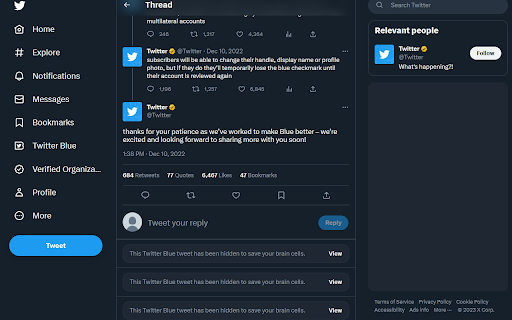
thank you for saving my brain cells
Jojo3.1 years ago
It works, braincells were preserved.
Charles Ndung'u3.1 years ago
This extension improved my Twitter experience once more.
The pointless, hateful yet boosted Tweets that seek engagement for money are a past for me now.
Thanks.
mark sure3.2 years ago
A must have for an "usable" twitter experience in 2023
Hot Piece Of Kek3.2 years ago
Used to work great, but as of recent it has made twitter stop loading entirely.
Not sure if its preventative measure from Twitter's way or something broke with the app, because prior to this it worked flawlessly.
We haven’t found close competitors for BlueLiteBlocker yet.