One research report for Save as Shortcut. Reports come with Plus, Pro and Max.
Takeaway & demandCited takeaway and search volumes
Traffic & domainPopularity rank, visits and authority
Money & pricingPlans and prices from the maker’s site
ReviewsComplaints and praise, quoted
Competitors & ranksRank against the closest listings
Build opportunityWhat to build and how to position it
Every number shows its source and date
Ready in a minute or two
Report and PDF yours for 30 days
Reviews
123 комп9 days ago
I too prefer saving links as files instead of as bookmarks, because if you have a lot bookmarks, your browser gets bloated. so this plugi is most welcome. however, it's not very intuitive in that it ultimately does exactly what a user would do manually by trying to save a web page as a file. that is, if your built-in chrome downloader brings up the file download dialog box, it only ads the extra step To (select a folder) and ok the save. now, if this extension could offer a way to automatically save the links as files to a specific folder without invoking the download box, that woud make this extension invaluable. please consider looking into adding this functionality. I'm sure you'll agree that it'd offer the most intuitive way to your own practice of saving links too. Thanks in advance!
Osman Vielma6 months ago
Excelente!
Alex S.16 months ago
this app is "drag-and-drop" substitution.
is useless when it comes to creating URL links from links on a page.
I'd prefer it to replace Chrome's built-in "save URL as" feature
Andario Andrada19 months ago
GREAT extension, HUGE problem.
UPDATE: Even disregarding the fact that the link you posted takes me back exactly to this very same page, I don´t undertand how YOU can understand posting here or elsewhere makes my critic any less valid, particularly when I´m telling you it´s a long, long time recurring problem over several systems OS and browsers. If nothing else, I would expect any reasonable person to address the issue you haven´t been able to adress for a long, long time, regardless of where it´s posted, instead of tryinig to scold users for not giving feedback where you want (then again, even your posted link does not even work). As such, I do not downvote my rating even more, in spite of your dismal reply and obvious inability to fix tis core features, simply because I appreciate your previous work. The way you go about it, for the most natural way to evaluate Chrome extensions in the Chrome store, it´s almost as bad as the issues reported. Please do as you please. Best.
I´ve been using this for a long, long time. I´ve used it with multiple browsers and multiple systems, from a Win 8.1 x64 tablet to a Win 11 Pro laptop, and I always run into the exact same problem, which has made me lose a zillion shortcuts, over time.
I have it configured to right click and save shortcut to desktop, using .html. And I would say 50% of the time does not work at all. I have to repeat the action a second time (sometimes even a third!) to achieve what I wanted.
As such, I´ve had to install third party extensions to give me a chime sound (Pavlovian dog style), so I don´t have to double check if my link is actually downloaded or not.
I don´t have a properly educated opinion, but I´d pretty much guarantee it depends on which page I´m on, and (maybe) which part of the page I right click. Second right click works 95% of the time, not the first one, which is why I´ve lost so many shortcuts, until I implemented the pavlovian thing.
I would certainly appreciate if you could identify what the heck is going on, for such a long time, Mr. Developer.
Thanks a lot.
Ernest N Pryor2 years ago
Probably I'm the guy who use this extension the more often on the Earth, even on the Universe. The last time, it's work "bad" on Microsoft Edge, save link all time on "download" name.
But today ALL work good like before. So thanks a lot.
Sorry, I'm not a rich guy to give you $100.00 or more money. If a day I win to the lottery I will give you something guaranteed to 100%. But the probability of this happening is the same as finding an honest politician on this planet one day. So 0%.
Thanks a lot for the WONDERFUL extension. I use it on Edge and Chrome.
Have happy day and more, good health all your life !
Carl Dorio2.1 years ago
The "Shortcut file type: Windows (.URL)" option no longer works on Microsoft Edge.
We still have a file named "download".
We have to manually rename it and add the .URL extension to it.
However, not so long ago, this extension with this option worked perfectly.
Strangely enough, on Google Chrome, there is no problem and everything works fine.
Hope this bug will be repair soon.
Thanks.
Arseniy P2.1 years ago
Крайне полезное расширение для yandex browser хромиума. Там удалили дефолтную возможность на пк перетаскиванием кнопки-ярлыка слева адресной строки создать ярлык на рабочем столе и тп в проводнике винды, или открыть этот адрес в другом браузере. Противные разрабы. Удалили топ функцию. что многие пользуют, ну или спрятали её ппц как неудобно и далеко.
Garik Teptor2.2 years ago
Работает.
Ken Berian2.7 years ago
Exactly what I was looking for.
MC202zipper2.8 years ago
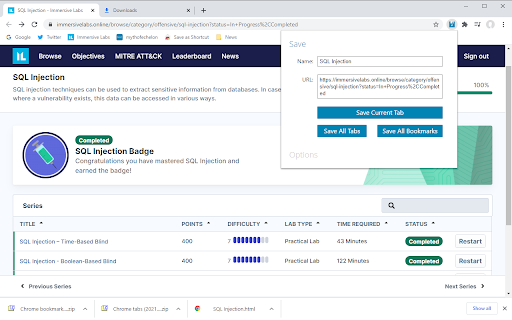
I've used this extension for quite a long time and I've never had a problem. What I find most useful is the "Save all tabs" option that allows me to make a zipped collection of the many (dozens, sometime) open pages on a specific subject, allowing for a "booklet" of different websites about it. "Save all bookmarks" is also nice, allowing me to often backup, quickly and effortlessy, all my bookmarks and having them with me on an USB just in a couple of seconds as a zipped URL folder, way faster and more convenient than the export/import original solution
Prashant3.3 years ago
Amazing!
Matthew3.7 years ago
Used to work good. Now when I save Chrome Web Pages to a folder, I'll go back in and click on the shortcut only to open on just the regular google homepage. Not the website. Oh well, anything good doesn't last forever.
yotta1173.7 years ago
Does whait it says, I would love it if it allowed me to select which ones
AAlexander Hjalmarsson4 years ago
Works like a charm, and thanks for the new update. It's very cool and useful!
EDIT: Stopped working on FB a couple of days ago :(
Laurent Hivon4 years ago
Je ne peux plus m'en passer. En deux clics, crée un hyperlien stocké comme un fichier. Grand merci.