Skip to content
Ask Claude about any Chrome extension, answered with Ext Watch data. See how →
Tools extension

Article Summary with ChatGPT and Take Notes

Summarize any webpage or article using ChatGPT. Summary generator for article.

by Castillo Richard · 5 listings

Add to RadarChrome Web Store Free plan tracks 1 extension · no card
extwatch.com/extensions/article-summary-with-chatgpt-and-take-notes-llkgpihjneoghmffllamjfhabmmcddfh
Article Summary with ChatGPT and TakeCastillo Richard · ToolsLow access
Users
6,000+
#2,484 of 118,787 in category
Rating
3.36
39 ratings · median 4.59
Version
1.0.6
179 KiB · Manifest V3
Access
Low16/100
3 permissions
From the store listing

Screenshots

2 images from the publisher · use the arrows or pick one · swipe or pick one

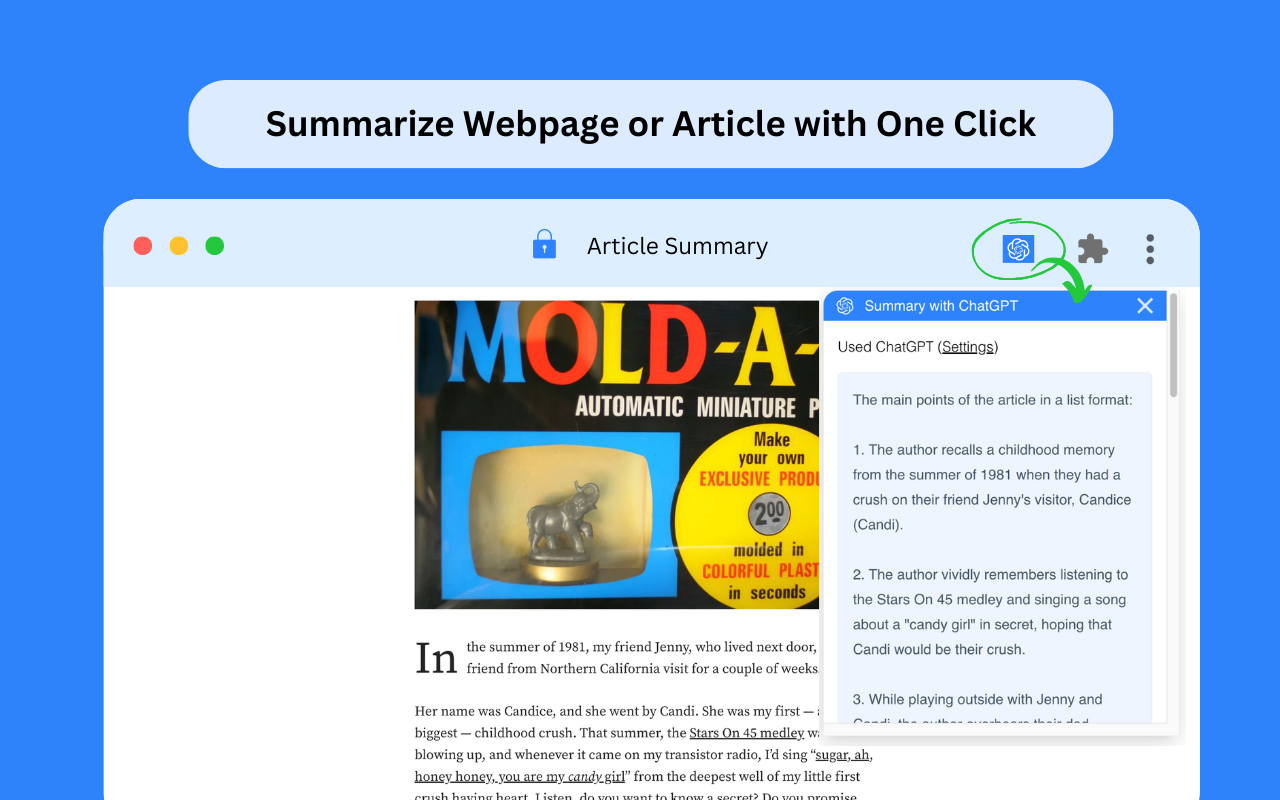
Article Summary with ChatGPT and Take Notes screenshot 1Article Summary with ChatGPT and Take Notes screenshot 2
1 / 2

Description

As written by the publisher on the store

Summarize any webpage or article using ChatGPT. Summary generator for article.

🚀Features:
ChatGPT with the Article Summary Generator is a free Chrome Extension that harnesses the power of OpenAI technology. With this extension, you can quickly access concise summaries of articles and webpages, saving you time and enhancing your learning experience. Give it a try today to streamline your reading and knowledge acquisition! Experience the following features:

  • One-Click Summarization: Quickly generate article summaries by clicking the logo.
  • Customizable Settings: Personalize ChatGPT prompts, login preferences, and more as needed.
  • Unrestricted Summaries: Summarize any webpage or article, significantly saving you time.
  • 🚀How to Use :
  • Log in to https://chat.openai.com.
  • Pin the extension and click on the logo.
  • Obtain the Article Summary or Website Summary.
  • If you encounter an error, try reopening openai.com. The service may be experiencing high demand.

💡 Q&A
Q1: What is ChatGPT?

A1: ChatGPT is an OpenAI-developed artificial intelligence chatbot based on OpenAI’s Generative Pre-trained Transformer (GPT) series of large language models (LLMs). ChatGPT can engage in conversations, respond to user requests, write stories, debug programming code, creative writing, and much more.

Q2: What is an Article summary?
A2: With the official support of OpenAI, an article summary is created to assist users in summarizing content while reading any article or webpage. This significantly saves time and enhances learning efficiency.

Q4: Do I need to create a ChatGPT/OpenAI account to use this extension?
A4: Yes, you must have a ChatGPT account to generate article summaries. You can create a free account at chat.openai.com, where you can also locate or generate your OpenAI API key.

Ratings and reviews

Split of the 36 written reviews we hold
Reviews on the store
3.3639 ratings on the store
36 written reviews we hold
5 ★44.4%16
4 ★11.1%4
3 ★11.1%4
2 ★0.0%0
1 ★33.3%12
Flávia Rodrigos

Estou adorando, os resumos realizados no you tube assim como dos artigos são de excelente qualidade valeu muito pena fazer o plano, alem da qualidade e rapidez para execução também faz sugestão pertinentes e relevantes. Não vi pontos negativos, fora o preço, kk mas esta valendo cada centavo investido

Tok Toku

I was hoping the summaries would work, but its too inconsistent. For now, I'm using GOAT Summarizer.

Amit

Unusual activity has been detected from your device.

SubwayJack919

Was amazing. Now it just gives this error for the last week. What's going on? "Unusual activity has been detected from your device. Try again later."

Kazibwe Yassin

Almost for one hour- I am searching for a working summary extension. Nothing seems to work. I am building mine and will publish it soon. It will be called #AIbrief.

Shilendra Soman

A lot of these summary extensions have stopped working. So I created a simple one for myself called "Hyperlink Summariser". You can check it out here: https://chromewebstore.google.com/detail/hyperlink-summariser-gpt/bnbdfmgpgljcllidjafocjjkobcdedpm You can summarise the current page as well as the links in the page with just a click. Helps you finish an article without getting sidetracked by hyperlinks which was my…

Radar

Track Article Summary with ChatGPT and Take on Radar

This page shows the listing as it is today. Add it to Radar and get one email when it changes.

  • Users and rating
  • Store text and screenshots
  • Permissions it asks for
Free plan tracks 1 extension · no card
Ext Watch Radar watchlist cards showing tracked extensions with users, rating, version and latest store change
Guide

Article Summary with ChatGPT and Take Notes, in plain words

What it is, what to use instead, what it can access and how to fix it.

At a glance

Article Summary with ChatGPT and Take Notes at a glance

Article Summary with ChatGPT and Take Notes is a Tools extension by Castillo Richard with 6,000 users. Chrome Web Store users rate it 3.36 out of 5 from 39 ratings. By users it sits in the top 5% of Tools extensions.

By users
#2,484of 118,787 in Tools
Rating
3.36category median 4.59
Access
Low16 of 100

Article Summary with ChatGPT and Take Notes alternatives

Closest by what they do · users as the store shows them · bars on a log scale
Article Summary with ChatGPT and Take Notes6K3.36 ★
ChatGPT Summarize100K4.2 ★YoutubeDigest: summarize using ChatGPT60K2.8 ★NoteGPT: Udemy Summary with ChatGPT & Claude8K4.1 ★NoteGPT: ChatGPT Summary for Vimeo5K3.8 ★PI Summarize1K3.5 ★
Permissions

Is Article Summary with ChatGPT and Take Notes safe?

Article Summary with ChatGPT and Take Notes asks for 3 permissions. None of them are on our list of wide-access permissions.

Permissions show what it could do, not what it does. See the full permission list.

16/ 100Low access
Article Summary with ChatGPT and Take Notes3 permissions
  • activeTabNot on our wide-access list
  • scriptingNot on our wide-access list
  • storageNot on our wide-access list

Every permission Article Summary with ChatGPT and Take Notes asks for

3 permissions · none sensitive · Low access overall

Browser permissions · 3

  • Work on the tab you click it onactiveTab
  • Run its code on pages it can accessscripting
  • Save its own settingsstorage

Sensitive marks access that reaches your data or other sites. The access level is a 0 to 100 score of all of it: under 25 is Low, 60 and up is High.

Troubleshooting

Article Summary with ChatGPT and Take Notes not working?

What recent reviews say

Store reviews from the last 90 days

No new reviews were posted in the last 90 days, so there are no fresh complaint signals.

Common fixes

Try them in this order
  1. 1Update Chrome and the extension
  2. 2Turn it off and on in chrome://extensions
  3. 3Reload the page
  4. 4Turn other extensions off in case two clash

Still stuck? Contact the maker or try an alternative.

298,549 Chrome extensions in one place

Know when a listing changes

Track any extension on Radar: users, rating, permissions and store text, with one email when something moves.

No credit card neededFree ExplorerAsk Claude about any extension