Skip to content
Ask Claude about any Chrome extension, answered with Ext Watch data. See how →
Workflow & Planning extension

Atom Material Icons

Atom Material Icons for Web (GitHub, BitBucket, Gitee, Azure and GitLab)

by Atom Material Themes and Plugins · 3 listings

Add to RadarChrome Web Store Free plan tracks 1 extension · no card
extwatch.com/extensions/atom-material-icons-pljfkbaipkidhmaljaaakibigbcmmpnc
Atom Material IconsAtom Material Themes and Plugins · Workflow & PlanningMedium access
Users
9,000+
#2,730 of 50,717 in category
Rating
4.61
23 ratings · median 4.38
Version
14.1.0
2.31 MiB · Manifest V3
Access
Medium32/100
1 permission + 10 site patterns
From the store listing

Screenshots

4 images from the publisher · use the arrows or pick one · swipe or pick one

Atom Material Icons screenshot 1Atom Material Icons screenshot 2Atom Material Icons screenshot 3Atom Material Icons screenshot 4
1 / 4

Description

As written by the publisher on the store

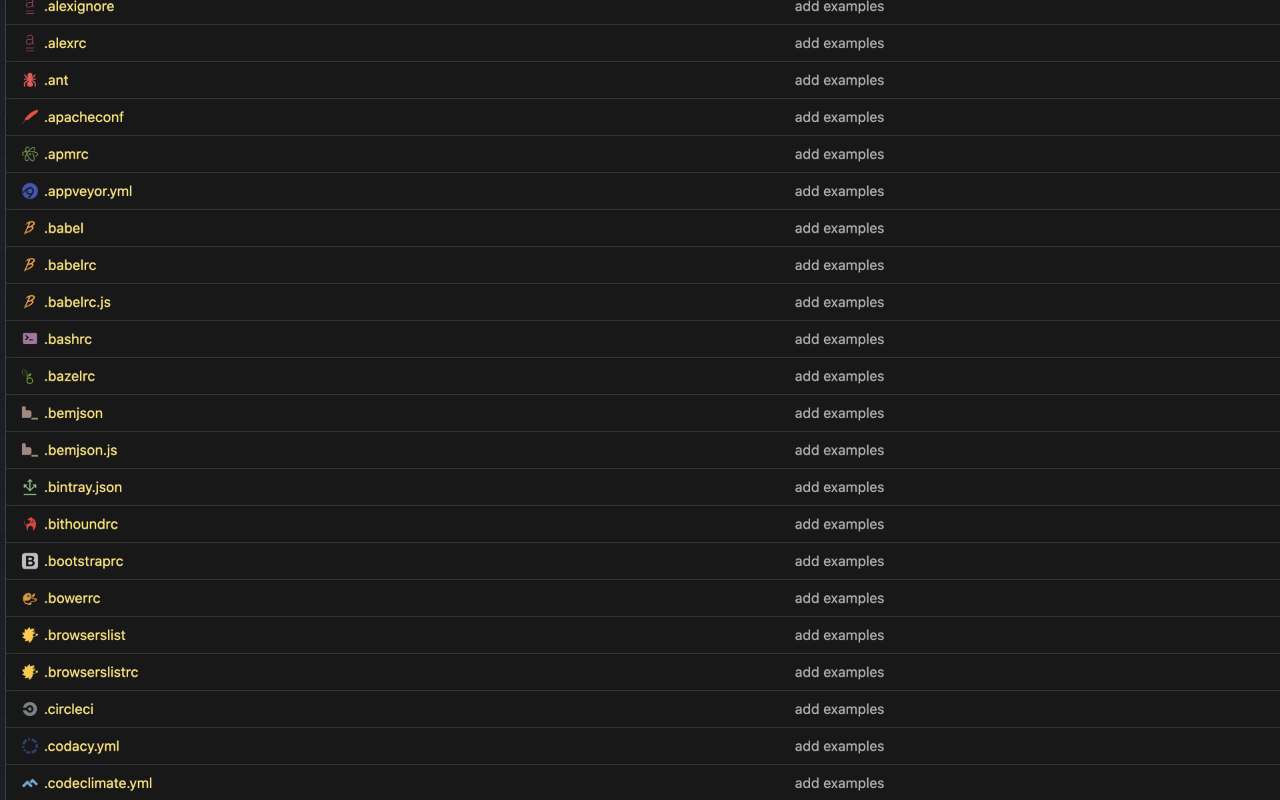
This extension replaces file icons in sites such as GitHub, GitLab or BitBucket according to their extensions or associated frameworks/libraries.

This is a porting of the famous extension Atom Material Icons for JetBrains (https://github.com/mallowigi/a-file-icon-idea), now in your web browser!

  • Works on:
  • GitHub (Repositories, Search and Pull Requests)
  • GitLab
  • Gitee
  • BitBucket
  • Azure
  • 0.0
  • Fix Styling in the GitHub Search
  • Improve performance on repositories with thousands of files, preventing freeze
  • Upgrade latest dependencies and icons
  • 0.0
  • Fix GitHub Code View not replacing icons on the tree
  • Fix Folder Icons in GitHub Pull Requests
  • Prevent wrong icon replacement in Azure
  • Import latest Atom Material Icons
  • Fix Icons losing their viewBox, reducing their size

11.0.0

  • Setting to hide the Floating Action Button
  • Fix display:flex in Github CSS

10.0.0

  • Support for Azure
  • Fix icon alignment issues
  • 0.0
  • Settings popup:
  • Monochrome mode
  • Custom Icon Size
  • Floating Button in the bottom right of the page to quickly toggle features!

Ratings and reviews

Split of the 18 written reviews we hold
Reviews on the store
4.6123 ratings on the store
18 written reviews we hold
5 ★66.7%12
4 ★22.2%4
3 ★5.6%1
2 ★5.6%1
1 ★0.0%0
Lennox (laGameTV)

very nice addition but makes loading large repos on github VERY slow.

Shane Zarechian

5 stars, but it would be great if they loaded faster

Jose Enrique Ricaldi

I would like that, but I would like it even more if they included all subdomains of GitLab or GitHub, even if they don’t end with .com

Francisco Peleato

The icons are beautiful but I wish it worked on Github Enterprise.

Ru Chern Chong

Nice extension to beautify GitHub repository!

mohamed Agoumi

not working in GitHub anymore and i have no idea why

Radar

Track Atom Material Icons on Radar

This page shows the listing as it is today. Add it to Radar and get one email when it changes.

  • Users and rating
  • Store text and screenshots
  • Permissions it asks for
Free plan tracks 1 extension · no card
Ext Watch Radar watchlist cards showing tracked extensions with users, rating, version and latest store change
Guide

Atom Material Icons, in plain words

What it is, what to use instead, what it can access and how to fix it.

At a glance

Atom Material Icons at a glance

Atom Material Icons is a Workflow & Planning extension by Atom Material Themes and Plugins with 9,000 users. Chrome Web Store users rate it 4.61 out of 5 from 23 ratings. By users it sits in the top 10% of Workflow & Planning extensions.

By users
#2,730of 50,717 in Workflow & Planning
Rating
4.61category median 4.38
Access
Medium32 of 100

Atom Material Icons alternatives

Closest by what they do · users as the store shows them
Atom Material Icons9K4.61 ★
JetBrains Toolbox Extension80K3.6 ★Sourcegraph70K4.4 ★Material Icons for GitHub20K4.9 ★Gitako - GitHub file tree9K4.9 ★Catppuccin for Web File Explorer Icons4K4.6 ★
Permissions

Is Atom Material Icons safe?

Atom Material Icons asks for 1 permission and access to 10 site patterns. None of them are on our list of wide-access permissions.

Permissions show what it could do, not what it does. See the full permission list.

32/ 100Medium access
Atom Material Icons1 permission
  • storageNot on our wide-access list

Every permission Atom Material Icons asks for

1 permission + 10 site patterns · none sensitive · Medium access overall

Sites

  • Read and change data on matching siteshttp://github.com/*
  • Read and change data on matching siteshttps://github.com/*
  • Read and change data on matching siteshttp://bitbucket.org/*
  • Read and change data on matching siteshttps://bitbucket.org/*
  • Read and change data on matching siteshttp://gitlab.com/*
  • Read and change data on matching siteshttps://gitlab.com/*
  • Read and change data on matching siteshttp://gitee.com/*
  • Read and change data on matching siteshttps://gitee.com/*
  • Read and change data on matching siteshttp://dev.azure.com/*
  • Read and change data on matching siteshttps://dev.azure.com/*

Browser permissions · 1

  • Save its own settingsstorage

Sensitive marks access that reaches your data or other sites. The access level is a 0 to 100 score of all of it: under 25 is Low, 60 and up is High.

Troubleshooting

Atom Material Icons not working?

What recent reviews say

Store reviews from the last 90 days

No new reviews were posted in the last 90 days, so there are no fresh complaint signals.

Common fixes

Try them in this order
  1. 1Update Chrome and the extension
  2. 2Turn it off and on in chrome://extensions
  3. 3Reload the page
  4. 4Turn other extensions off in case two clash

Still stuck? Contact the maker or try an alternative.

297,753 Chrome extensions in one place

Know when a listing changes

Track any extension on Radar: users, rating, permissions and store text, with one email when something moves.

No credit card neededFree ExplorerAsk Claude about any extension