Skip to content
Ask Claude about any Chrome extension, answered with Ext Watch data. See how →
Functionality & UI extension

Auto Tab Discard

Increase browser speed and reduce memory load when you have numerous open tabs.

by joue.quroi · 16 listings

Add to RadarChrome Web Store Free plan tracks 1 extension · no card
extwatch.com/extensions/auto-tab-discard-jhnleheckmknfcgijgkadoemagpecfol
Auto Tab Discardjoue.quroi · Functionality & UIMedium access
Users
100K+
#37 of 11,914 in category
Rating
4.09
397 ratings · median 4.55
Version
0.7.7
240 KiB · Manifest V3
Access
Medium47/100
6 permissions + every website
From the store listing

Screenshots

4 images from the publisher · use the arrows or pick one · swipe or pick one

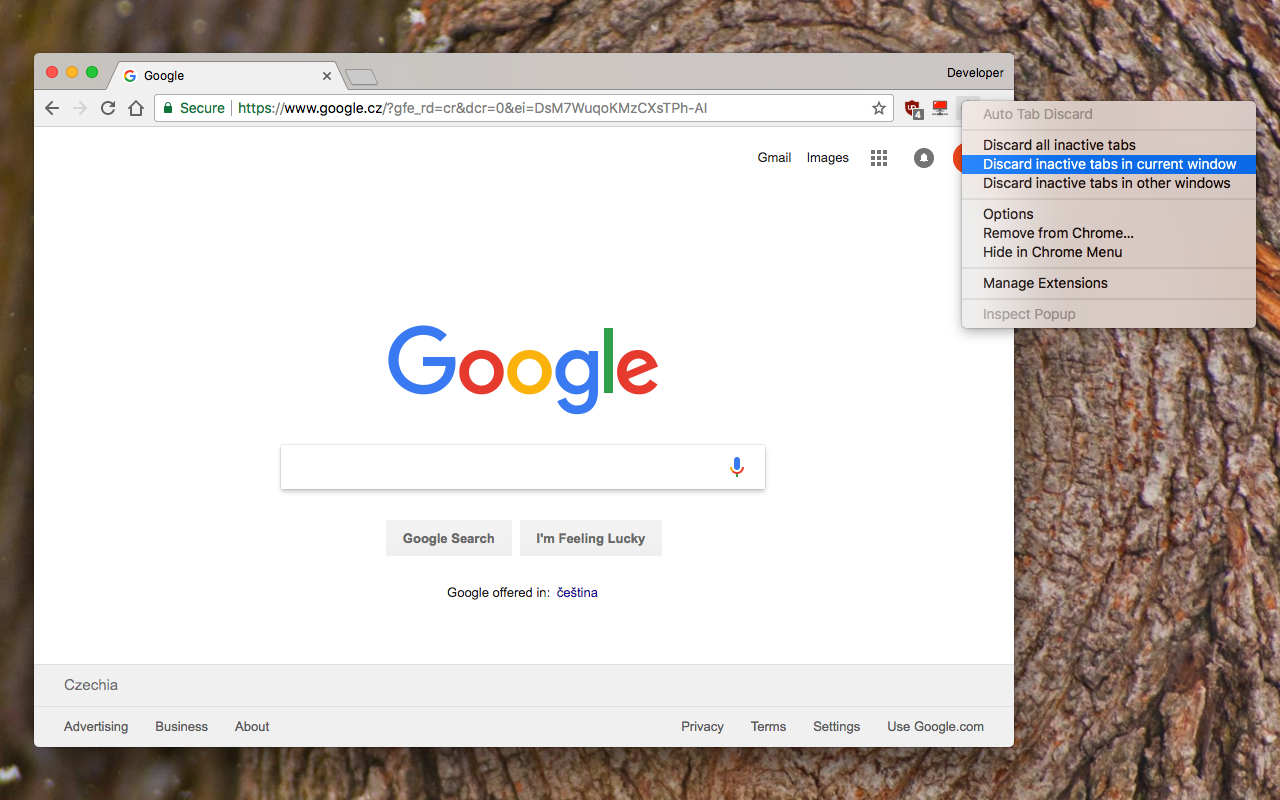
Auto Tab Discard screenshot 1Auto Tab Discard screenshot 2Auto Tab Discard screenshot 3Auto Tab Discard screenshot 4
1 / 4

Description

As written by the publisher on the store

"Auto Tab Discard" is a lightweight browser extension that automatically reduces the amount of memory used by open but inactive tabs, helping to conserve battery life on portable devices by disabling JavaScript code and DOM events on discarded tabs.

Preview

https://www.youtube.com/watch?v=ityhxUPp3y8

Instruction

There are two options on the extension's interface to either discard tabs or release discarding (the "x" buttons)

The features of "Auto Tab Discard" are

  • Improves browser performance and reduces memory usage by automatically or manually discarding inactive, idle, or forgotten tabs.
  • Includes a list of hostnames or regular expressions that can be excluded from auto-discarding.
  • Preserves the discarded state of tabs when the browser is closed and reopened.
  • Indicates the discarded state of a tab through the favicon or title.
  • Restores the state of a tab, including scroll position and text box content, after it is released from being discarded.
  • Allows for the forced discarding of specified hostnames.

The options for configuring whether tabs should be discarded or not include:

  • Pinned tabs
  • Tabs that are playing media
  • The presence of a power source
  • Unsaved content or user input in a tab

The available plugins for "Auto Tab Discard" are

  • Release the discarded state of the next or previous tab.
  • Release the discarded state of all tabs in the active window.
  • Automatically discard all newly opened inactive tabs.
  • Store YouTube's timestamp before a tab is discarded.
  • Permanently delete (remove) old discarded tabs that are inactive.

Notes

* Unlike the "The Great Suspender" extension, this extension uses the native method for discarding tabs, which means that even if the extension is removed or the browser crashes, your browser will automatically restore everything for you.

Privacy Policy

https://webextension.org/privacy-policy/extension/tab-discard.html

Ratings and reviews

Split of the 417 written reviews we hold
Reviews on the store
4.09397 ratings on the store
417 written reviews we hold
5 ★49.2%205
4 ★16.5%69
3 ★12.9%54
2 ★9.6%40
1 ★11.8%49
Soham

Bestest Chromium Extension ever! I am a guy who has atleast ~60 tabs open every time and this extension is a lifesaver to suspend most of them to reduce sys usage!

David Higgs

Amazing utility, saved me 40% of my 32 GB of RAM instantly. And the ability to keep YouTube video timestamps on inactive ("killed") tabs actually makes it *more* seamless than without the plugin, on top of the memory saving! Reloading pages has also been quite fast for me in general which means there's basically no downside, though that could be due to having a fairly new-ish laptop that is more mid-range rather than…

Vladislav V

работает окей, спасает от зависания мак. хром конечно офигел с таким потреблением

Cristian

La mejor extensión para mejorar el rendimiento. Probada en una Canaima letras rojas Celeron 847 4GB RAM HDD.

Efe the Captain

It WAS good. This is the culprit that causes my browser to crash I believe. Cannot prove it with documentation. But after I disabled it, my browser no longer crashes.

Serhii Honcharov

Doesn't work at all on latest chrome, works only when Force discard(ignore exception) set.

Radar

Track Auto Tab Discard on Radar

This page shows the listing as it is today. Add it to Radar and get one email when it changes.

  • Users and rating
  • Store text and screenshots
  • Permissions it asks for
Free plan tracks 1 extension · no card
Ext Watch Radar watchlist cards showing tracked extensions with users, rating, version and latest store change
Guide

Auto Tab Discard, in plain words

What it is, what to use instead, what it can access and how to fix it.

At a glance

Auto Tab Discard at a glance

Auto Tab Discard is a Functionality & UI extension by joue.quroi with 100K users. Chrome Web Store users rate it 4.09 out of 5 from 397 ratings. By users it sits in the top 1% of Functionality & UI extensions.

By users
#37of 11,914 in Functionality & UI
Rating
4.09category median 4.55
Access
Medium47 of 100

Auto Tab Discard alternatives

Closest by what they do · users as the store shows them
Auto Tab Discard100K4.09 ★
Disable automatic tab discarding100K3.4 ★The Great-er Tab Discarder10K4.3 ★Tab Suspender 2.07K4.3 ★No-Tabs-Auto-Discard6K3.7 ★Tab Discard (Suspender)5K4.6 ★
Permissions

Is Auto Tab Discard safe?

Auto Tab Discard asks for 6 permissions and access to every website. One of them gives wide access.

Permissions show what it could do, not what it does. See the full permission list.

47/ 100Medium access
Auto Tab Discard6 permissions · 1 wide
  • <all_urls>Read and change data on every website

Every permission Auto Tab Discard asks for

6 permissions + every website · 1 sensitive · Medium access overall

Sites

  • Read and change data on every website*://*/*

Browser permissions · 6

  • Notice when you are awayidle
  • Save its own settingsstorage
  • Add items to the right-click menucontextMenus
  • Show desktop notificationsnotifications
  • Run tasks on a schedulealarms
  • Run its code on pages it can accessscripting

Sensitive marks access that reaches your data or other sites. The access level is a 0 to 100 score of all of it: under 25 is Low, 60 and up is High.

Troubleshooting

Auto Tab Discard not working?

What recent reviews say

Store reviews from the last 90 days
5 of 13gave 1 or 2 stars
1–2 stars 3–5 stars
stopped working or broken2 of 3

Themes in the 3 most recent low reviews. One review can raise more than one.

Common fixes

Try them in this order
  1. 1Update Chrome and the extension
  2. 2Turn it off and on in chrome://extensions
  3. 3Reload the page
  4. 4Turn other extensions off in case two clash

Still stuck? Contact the maker or try an alternative.

297,753 Chrome extensions in one place

Know when a listing changes

Track any extension on Radar: users, rating, permissions and store text, with one email when something moves.

No credit card neededFree ExplorerAsk Claude about any extension