

★★★★★ygodown 18k
really good, was hard to find one that works how I want it to
Delete browsing data directly from the browser toolbar. Clear cookies, history and cache with a single click.
by Armin Sebastian · 8 listings
2 images from the publisher · use the arrows or pick one · swipe or pick one
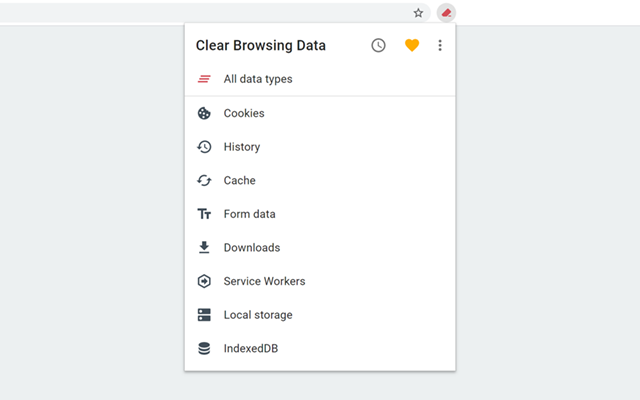

Clear Browsing Data is a browser extension which enables you to delete browsing data, such as cookies, history and cache, directly from the browser toolbar. The toolbar button can be configured to clear all browsing data with a single click, or to show a list of data types available for clearing.
Clear Browsing Data is an open source project made possible thanks to a community of awesome supporters. If you'd like to support the continued development of the extension, please check out https://armin.dev/go/patreon.
The extension also supports closing and reloading tabs, these features can be configured from the extension's options.
The data types and their order can be customized from the extension's options.
The extension is also available for Edge and Firefox: https://github.com/dessant/clear-browsing-data#readme
The developer does not collect any personal data from this extension, visit the extension's privacy policy for more information.
Reviews are not monitored for bug reports, please use GitHub for issues and feature requests.
https://github.com/dessant/clear-browsing-data
really good, was hard to find one that works how I want it to
It has worked for me. I mostly use it to clear download history. I would like to use it to clear browser history, but I guess Chrome is set up to delete ALL browser history when I want to keep bookmark history. The reason I am giving this four stars instead of five stars is because the extension was updated a day ago and the update caused me to lose all of my extension settings. So now it deletes EVERYTHING, and now…
My mom will never find out i am watching p0rn.
Please put in a whitelist for cookies, otherwise it works well.
This Extension is no longer working as of now from when this was last updated. we are in 2026 and this thing hasnt been updated since February 21, 2025. So dont use this, it wont work as of 2026. might get updated im not sure but its almost been 1 year.
Does not delete history. At all. I checked the settings, and nothing works. Perhaps this has been deprecated, as Google has radically changed the ability to auto-delete history.
This page shows the listing as it is today. Add it to Radar and get one email when it changes.

What it is, what to use instead, what it can access and how to fix it.
Clear Browsing Data is a Developer Tools extension by Armin Sebastian with 20K users. Chrome Web Store users rate it 4.08 out of 5 from 37 ratings. By users it sits in the top 5% of Developer Tools extensions.
Clear Browsing Data asks for 3 permissions. One of them gives wide access.
Permissions show what it could do, not what it does. See the full permission list.
browsingDataDelete your browsing databrowsingDatanotificationsstorageSensitive marks access that reaches your data or other sites. The access level is a 0 to 100 score of all of it: under 25 is Low, 60 and up is High.
No new reviews were posted in the last 90 days, so there are no fresh complaint signals.
Still stuck? Contact the maker or try an alternative.
Track any extension on Radar: users, rating, permissions and store text, with one email when something moves.


