

★★★★★Mohamed Hassan
the most reliable AI am using in all of my work in terms of systematic and organized analyses and convenient answers, with flexibility in uploading nemeuros files also the renaming of title/thread is usefull.
Use DeepSeek Chat Exporter to smartly export DeepSeek chat conversations, supporting various formats such as PDF, HTML, Markdown,…
by lyq · 12 listings
1 image from the publisher
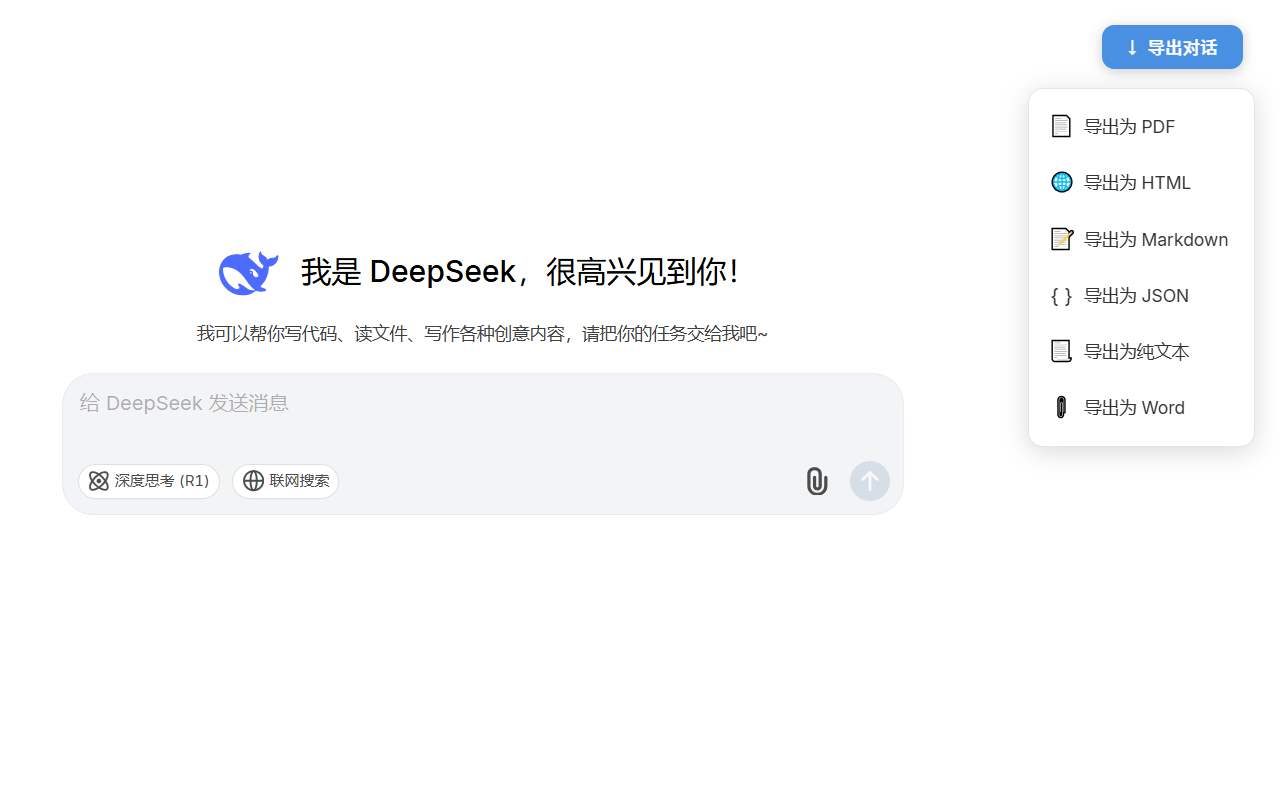
DeepSeek Chat Exporter – Export plugin that allows users to easily export chat content in various formats, including PDF, HTML, Markdown, JSON, TXT, and Word, enabling you to save, share, and manage conversation data in the most convenient way.
Bug Fix:
v1.0.9 - Fixed the bug where the export PDF of some chat dialog boxes was empty
v1.0.5 - Fixed the bug where only user information was exported
🚀 Support for Multiple Export Formats
Whether you need to save the conversation as a document, webpage, or require a code-friendly format for further processing, our plugin provides perfect support. Here are the supported formats:
PDF: High-quality printable format, suitable for official archiving.
HTML: Webpage format, easy to view and share online.
Markdown: Text format, easily integrates with other tools and platforms.
JSON: Developer-friendly format for post-analysis and processing.
TXT: Simple text format, easy and straightforward.
Word: Export the conversation as a Microsoft Word document, convenient for document editing.
🖼 Clean and Beautiful Interface Design
The plugin provides an intuitive and easy-to-operate user interface, ensuring users can quickly choose export formats, view, and edit conversation content. The export buttons for each format are clearly visible and come with simple icons for a smooth user experience.
Clear Format Selection: With a simple dropdown menu, users can easily choose the desired export format.
Real-time Preview: View the current conversation content and select the export method.
Customizable Options: Users can adjust export content details to meet their personal needs.
🛠 Simple and Easy-to-Use Features
Select Conversation Content:
Through the plugin interface, you can select the current DeepSeek conversation content, easily edit or view it.
Choose Export Format:
On the interface, you can choose the export format you need, such as PDF, Markdown, JSON, etc., from a dropdown menu.
Click Export Button:
After making the selection, simply click the "Export" button to quickly generate and download the desired file format.
Save and Share:
The exported file can be saved directly to your local device, or shared easily with colleagues or friends through other tools.
Work Document Storage:
Save conversation content as Word or PDF format for future reference or printing.
Sharing and Collaboration:
Export the conversation as HTML or Markdown format to easily share with your team or friends.
Data Analysis:
Export conversation content in JSON format for programmatic processing and analysis.
Conclusion
The DeepSeek Export Plugin allows you to export conversation content in multiple formats, making it easy to manage and share every interaction.
Whether for official archiving, discussion sharing, or data analysis, our plugin ensures efficient operations.
Make DeepSeek smarter and more convenient to enhance your work efficiency! Download the plugin now and experience the new export features! ✨
All data processing is done locally, so you don’t have to worry about privacy leaks, keeping your chat records safe.
the most reliable AI am using in all of my work in terms of systematic and organized analyses and convenient answers, with flexibility in uploading nemeuros files also the renaming of title/thread is usefull.
помогает в конкретных делах.не рекомендую использовать для психологии .
Appena scaricata, la proverò e recensirò dopo test
من با این هوش مصنوعی هم گزارش می نویسم و هم مقاله و هم یک کتاب نوشتم. !!!
This is a W it acually exports the chat correctly XD
i don't like being forced to review before using the tool. that's abominable.😡
This page shows the listing as it is today. Add it to Radar and get one email when it changes.

What it is, what to use instead, what it can access and how to fix it.
DeepSeek Chat Exporter is a Tools extension by lyq with 10K users. Chrome Web Store users rate it 4.09 out of 5 from 290 ratings. By users it sits in the top 5% of Tools extensions.
DeepSeek Chat Exporter asks for 1 permission. None of them are on our list of wide-access permissions.
Permissions show what it could do, not what it does. See the full permission list.
storageNot on our wide-access liststorageSensitive marks access that reaches your data or other sites. The access level is a 0 to 100 score of all of it: under 25 is Low, 60 and up is High.
1 stari don't like being forced to review before using the tool. that's abominable.😡
Still stuck? Contact the maker or try an alternative.
Track any extension on Radar: users, rating, permissions and store text, with one email when something moves.


