

★★★★★li fangbo
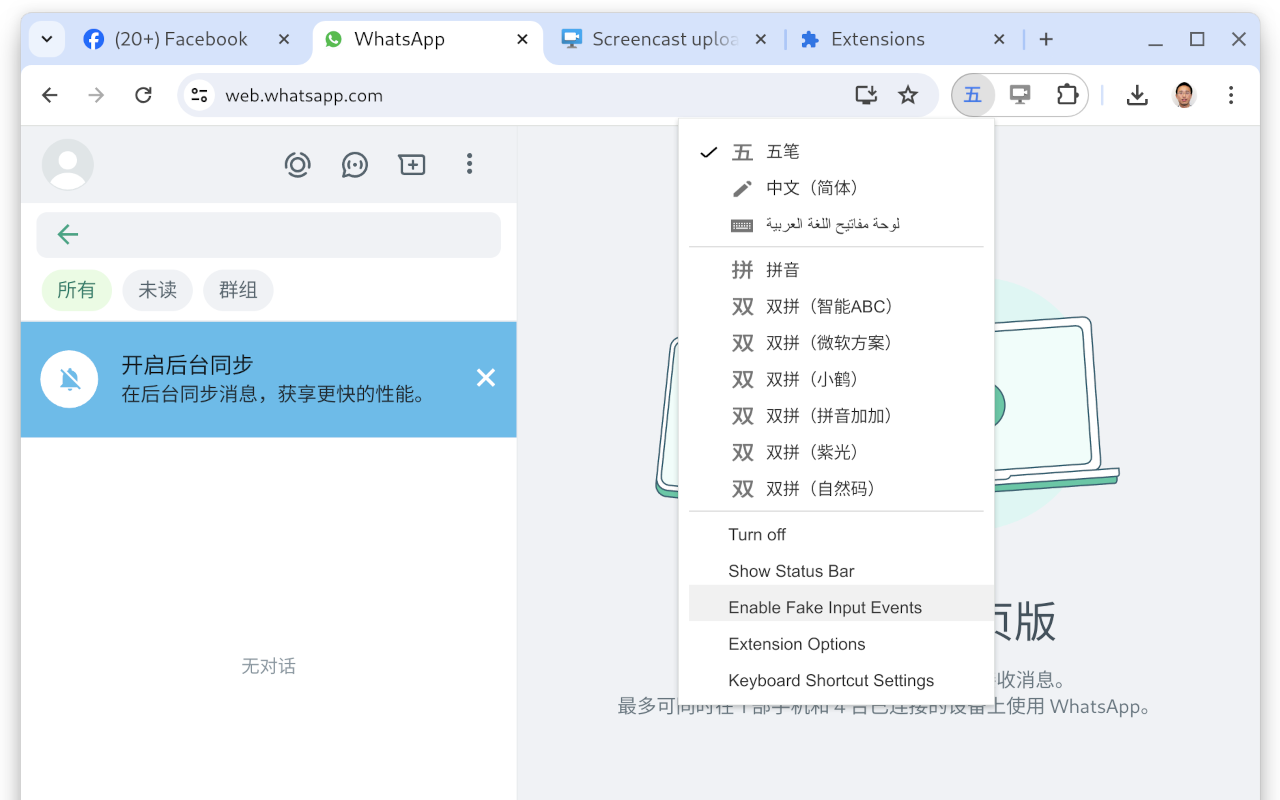
Could you please re-enable the 'enable fake events' option? Our entire company relies on this setting.
Input Tools lets you type in the language of your choice.
by Google LLC · 1 listing
5 images from the publisher · use the arrows or pick one · swipe or pick one


By installing this extension, you agree to the Terms of Service at http://www.google.com/intl/en/policies/terms/.
Switch to typing in a different language with the click of the mouse, and switch back just as easily. The Google Input Tools extension provides virtual keyboards for over 90 languages, full IMEs or direct transliteration for over 30 different scripts, and handwriting input for over 40 languages.
What's New?
When you first install the extension, click on the extension icon, then select "Extension Options" in the pop-up menu. A new tab will appear where you can select your preferred languages or input methods. The keyboards, IMEs or handwriting input you add to 'Selected input tools' can be enabled at any time from the extension itself. You can always return to this options page to add, remove, or change the order of your input tools.
input tool, simply click on the extension icon, select the desired language tool in the pop-up menu, then click on any text box on the web page. To turn off an input tool, click on the extension icon and select the "Turn Off" option.
To use transliteration, type languages phonetically in English letters, and they'll appear in their correct alphabet. Keep in mind that transliteration is different from translation; the sound of the words is converted from one alphabet to the other, not the meaning. For example, to get in नमस्ते with Hindi transliteration, type in n-a-m-a-s-t-e. You will get a list of Hindi words sound like namaste. Then, press SPACE to select the first suggestion नमस्ते.
Latin IMEs are to help people type in Latin-script languages using the US keyboard. Features include automatic diacritics, spell correction, and prefix completion. To use Latin IMEs, type unaccented letters, and they will be corrected to a desired word. For example, type "franca" in French IME, "français" appears, and it can be committed by pressing TAB. If continuously typing "francais", "français" will be committed by
pressing SPACE. To get all the candidates for "francais", press BACKSPACE.
To use handwriting input, select the handwriting input of your desired language. Press trackpad or left click of mouse to hand draw a character on the pop-up handwriting panel. Select the character from the suggestion list, or simply press ENTER or SPACE key to select the first suggestion.
Need help? Find a problem? Point your browser here for support:
https://chrome.google.com/webstore/support/mclkkofklkfljcocdinagocijmpgbhab
✓ ALT+SHIFT+N - Switch to next input tool in the list (if the extension is off, turn it on; if the current input tool is the last tool in the list, turn the extension off)
✓ ALT+SHIFT+R - Revert to the last input tool used (if none, turn off the extension)
✓ ALT+SHIFT+T Toggle the current input tool.
Due to security features of Google Chrome, the Google Input Tools extension will not assist with input in the address bar (omnibox), on the Chrome Web Store, or inside of other Chrome extensions. It does not currently assist with input inside of Flash applications.
By installing this extension, you agree to the Terms of Service at https://chrome.google.com/extensions/intl/en /gallery_tos.html
Could you please re-enable the 'enable fake events' option? Our entire company relies on this setting.
Google doesn't even t=kniw how much I'm thankful for this huge silent creation of huge free tols add also, walking hours with me. Especally the how much liked my profile for being in Deep Tech, iit became an paper hahaha. I'm the senior AI Architect that I became because of you.. Soon, after the projects is taking more than too nuch from me... Studying specificly to ofificially be he honred to enter in the companny t…
This page shows the listing as it is today. Add it to Radar and get one email when it changes.

What it is, what to use instead, what it can access and how to fix it.
Google Input Tools is a Tools extension by Google LLC with 4M users. Chrome Web Store users rate it 3.67 out of 5 from 5,587 ratings. By users it sits in the top 1% of Tools extensions.
Google Input Tools asks for 4 permissions and access to every website. 2 of them give wide access.
Permissions show what it could do, not what it does. See the full permission list.
<all_urls>Read and change data on every websitetabsSee the address and title of every open tabhttp://*/*tabsoffscreenstoragescriptingSensitive marks access that reaches your data or other sites. The access level is a 0 to 100 score of all of it: under 25 is Low, 60 and up is High.
Still stuck? Contact the maker or try an alternative.
Track any extension on Radar: users, rating, permissions and store text, with one email when something moves.


