Skip to content
Ask Claude about any Chrome extension, answered with Ext Watch data. See how →
Art & Design extension

Image editor PaintMagick for photos

PaintMagick to create and edit photos and images online using a web browser

by RedcoolMedia · 16 listings·redcoolmedia.net

Add to RadarChrome Web Store Free plan tracks 1 extension · no card
extwatch.com/extensions/image-editor-paintmagick-for-photos-gefjgcijamcglmolelmpeegnflbjalfa
Image editor PaintMagick for photosRedcoolMedia · Art & DesignMedium access
Users
2,000+
#212 of 3,712 in category
Rating
2.64
14 ratings · median 4.60
Version
1.3.5
474 KiB · Manifest V3
Access
Medium54/100
2 permissions + every website
From the store listing

Screenshots

3 images from the publisher · use the arrows or pick one · swipe or pick one

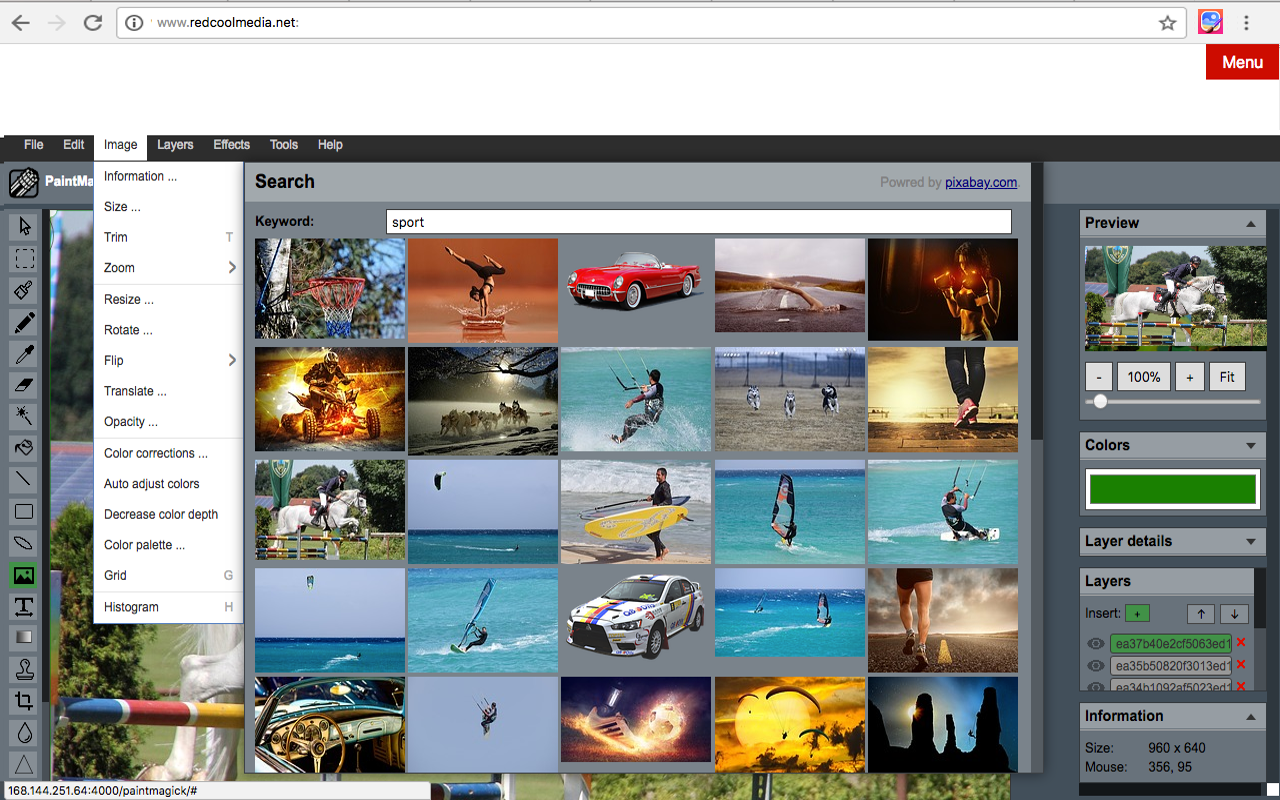
Image editor PaintMagick for photos screenshot 1Image editor PaintMagick for photos screenshot 2Image editor PaintMagick for photos screenshot 3
1 / 3

Description

As written by the publisher on the store

PaintMagick is an image editor for photos and draws with advanced drawing features, effects and filters. It allows to create and edit images directly in the web browser. You can create images, paste from clipboard (ctrl+v) or upload from computer (using menu or drag & drop). Everything stays in your web browser.

Its main features are

  • Files: open images, directories, URL, drag and drop, save, print.
  • Edit: undo, cut, copy, paste, selection, paste from clipboard.
  • Image: information, EXIF, trim, zoom, resize (Hermite resample, default resize), rotate, flip, color corrections, etc
  • Layers: multiple layers system, differences, merge, flatten, Transparency support.
  • Effects: Black and White, Blur (box, Gaussian, stack, zoom), Bulge/Pinch, ...
  • Tools like pencil or brush.
  • Help: keyboard shortcuts, translations.

Ratings and reviews

Split of the 6 written reviews we hold
Reviews on the store
2.6414 ratings on the store
6 written reviews we hold
5 ★33.3%2
4 ★0.0%0
3 ★0.0%0
2 ★0.0%0
1 ★66.7%4
Tom T

Completely useless. It refreshes/reloads about every 30 seconds, so any work you did disappears. Why would anyone make something like this?

Alexis Torres

TREMENDA BASURA! PAINT LE DA 20 PATADAS Y CON ESO DIGO MUCHO! NO ME SIRVIO PARA NADA, SOLO PARA PERDER MI TIEMPO!!!

Radar

Track Image editor PaintMagick for photos on Radar

This page shows the listing as it is today. Add it to Radar and get one email when it changes.

  • Users and rating
  • Store text and screenshots
  • Permissions it asks for
Free plan tracks 1 extension · no card
Ext Watch Radar watchlist cards showing tracked extensions with users, rating, version and latest store change
Guide

Image editor PaintMagick for photos, in plain words

What it is, what to use instead, what it can access and how to fix it.

At a glance

Image editor PaintMagick for photos at a glance

Image editor PaintMagick for photos is an Art & Design extension by RedcoolMedia with 2,000 users. Chrome Web Store users rate it 2.64 out of 5 from 14 ratings, which is still a small sample. By users it sits in the top 10% of Art & Design extensions.

By users
#212of 3,712 in Art & Design
Rating
2.64category median 4.60
Access
Medium54 of 100

Image editor PaintMagick for photos alternatives

Closest by what they do · users as the store shows them · bars on a log scale
Image editor PaintMagick for photos2K2.64 ★
Gimp online - image editor and paint tool300K2.5 ★Polarr - Online Photo Editor10K3.0 ★Photo Editor9K4.2 ★Photo Editor in Google Chrome™7K3.0 ★FotoFlexer - Online Photo Editor421no rating
Permissions

Is Image editor PaintMagick for photos safe?

Image editor PaintMagick for photos asks for 2 permissions and access to every website. 2 of them give wide access.

Permissions show what it could do, not what it does. See the full permission list.

54/ 100Medium access
Image editor PaintMagick for photos2 permissions · 2 wide
  • <all_urls>Read and change data on every website
  • webNavigationFollow every page you open

Every permission Image editor PaintMagick for photos asks for

2 permissions + every website · 2 sensitive · Medium access overall

Sites

  • Read and change data on every websitehttps://*/*

Browser permissions · 2

  • Follow every page you openwebNavigation
  • Save its own settingsstorage

Sensitive marks access that reaches your data or other sites. The access level is a 0 to 100 score of all of it: under 25 is Low, 60 and up is High.

Troubleshooting

Image editor PaintMagick for photos not working?

What recent reviews say

Store reviews from the last 90 days

No new reviews were posted in the last 90 days, so there are no fresh complaint signals.

Common fixes

Try them in this order
  1. 1Update Chrome and the extension
  2. 2Turn it off and on in chrome://extensions
  3. 3Reload the page
  4. 4Turn other extensions off in case two clash

Still stuck? Contact the maker or try an alternative.

298,549 Chrome extensions in one place

Know when a listing changes

Track any extension on Radar: users, rating, permissions and store text, with one email when something moves.

No credit card neededFree ExplorerAsk Claude about any extension