Skip to content
Ask Claude about any Chrome extension, answered with Ext Watch data. See how →
Workflow & Planning extension

Live Screen Recorder

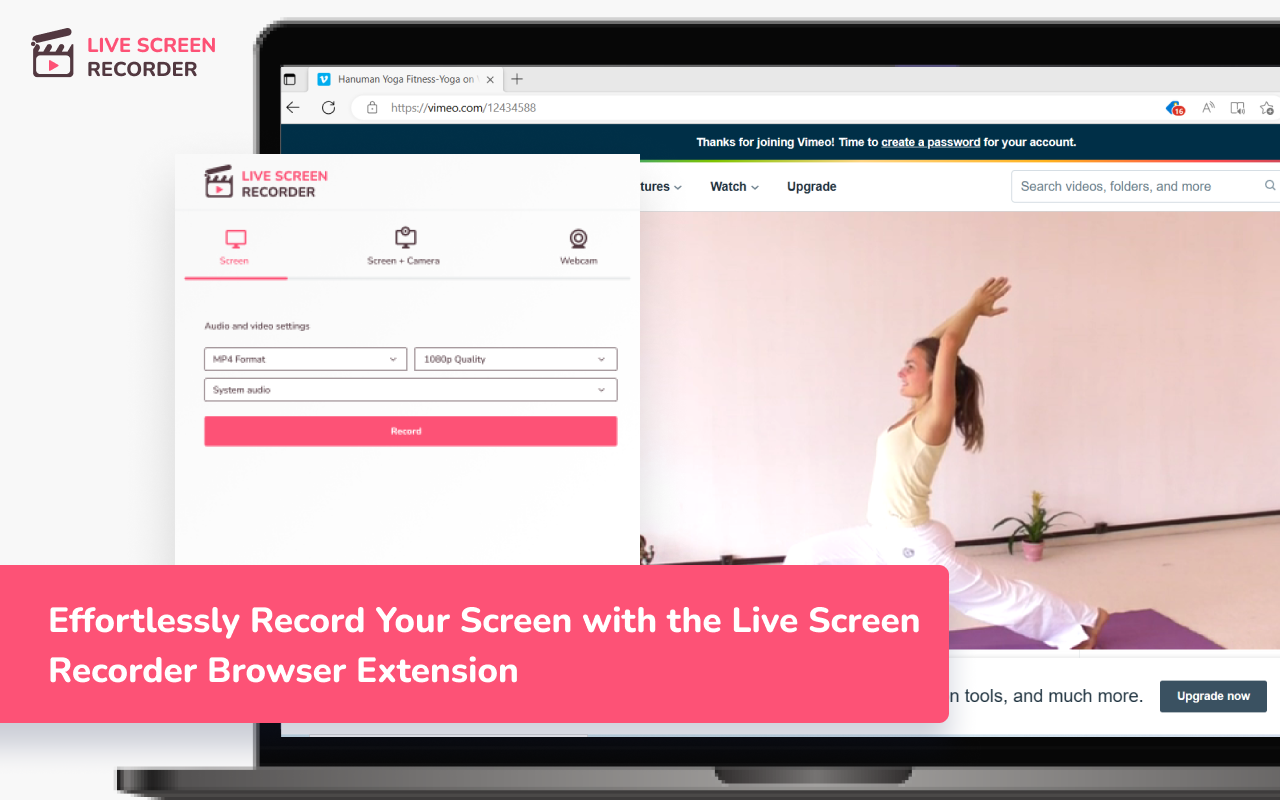
Effortlessly Record Your Screen with the Live Screen Recorder Browser Extension

by Henry Birch · 1 listing

Add to RadarChrome Web Store Free plan tracks 1 extension · no card
extwatch.com/extensions/live-screen-recorder-pcjdfmihalemjjomplpfbdnicngfnopn
Live Screen RecorderHenry Birch · Workflow & PlanningMedium access
Users
30K+
#1,345 of 50,971 in category
Rating
4.19
54 ratings · median 4.38
Version
1.1.2
272 KiB · Manifest V3
Access
Medium59/100
7 permissions + every website
From the store listing

Screenshots

1 image from the publisher

Live Screen Recorder screenshot 1

Description

As written by the publisher on the store

Are you looking for an easy way to record your screen and create engaging videos? Look no further than the Live Screen Recorder browser extension!

With the Live Screen Recorder, you can easily record your desktop screen or a single tab in your browser. You can also add your webcam video and microphone audio to your recordings, making them more personalized and engaging. And if you only need to record your webcam and microphone, the Live Screen Recorder has got you covered!

We support both mp4 and webm formats, making it easy for you to share your recordings with others. And the best part? The Live Screen Recorder is available for free, so you can start using it right away without any hassle.

  • Features:
  • Record a desktop screen or a single tab
  • Add webcam video and microphone audio
  • Record just webcam and microphone
  • Supports mp4 and webm formats
  • (Beta) Blur sensitive fields while recording
  • For whom:
  • Teachers: Can easily record online lectures, tutorials, and presentations with the Live Screen Recorder, making it easier to connect with students and provide more engaging learning experiences.
  • Developers: Can record their screen to create tutorials and share their expertise with other developers, helping to improve the quality of their work and facilitate collaboration with others.
  • Designers: Can record their screen to showcase their design process and share their ideas with others, making it easier to collaborate with clients and colleagues.
  • Video professionals: Can use the Live Screen Recorder to create high-quality videos with screen recordings, webcam video, and microphone audio, helping to improve the production value of their work.

So why wait? Try the Live Screen Recorder browser extension today and take your content creation to the next level!

Ratings and reviews

Split of the 49 written reviews we hold
Reviews on the store
4.1954 ratings on the store
49 written reviews we hold
5 ★65.3%32
4 ★14.3%7
3 ★2.0%1
2 ★2.0%1
1 ★16.3%8
rain red

真的好用,可以中途暫停再開啟,結束後要儲存時,也不會網頁亂跳或直接消失找不到檔案.

erieri 555

chromeの機能拡張で使えるrecorderを色々試しました。 登録も求めてこないし、一番画質、音質が良かったです。 だた、おそらくファイルサイズが2GBかな?一定を超えると必ずエラーとなり途中で止まってしまいます。 エラーが出た場合はせめてそれまで録画したものを自動保存するとかがあれば最高です。 私の場合、1時間半くらい録画すると必ずエラーになりました。 長時間撮っていてエラーになるとすごく悲しいです。

Gabriel Hadad

não da problema, um pouco pesado mas ta mais que bom

HOCINE “HOSEEN” BENFERHAT

works great on fandango. it even removes the ads

Michail Malkov

недоделанная пустышка. написанная неучем программистом. не работает. интуитивного понимания нет . работает через раз до 13 сек. за это время не возможно что то создать и передать ни учителям ни пользованею который хотел бы иметь файл в записи.. бесполезная вещь от слова совсем бесполезная. не стоит внимания и изучения.

Ednor Désir

Absolute nightmare of an extension. I used this to record a critical 3-hour session. Right at the end, the extension completely crashed my browser tab. When an app crashes, it should at least save a temporary backup file or a corrupted cache block that can be repaired. Instead, this extension completely wiped the entire recording from existence. I spent hours hunting through Chrome's IndexedDB, local blob storage, a…

Radar

Track Live Screen Recorder on Radar

This page shows the listing as it is today. Add it to Radar and get one email when it changes.

  • Users and rating
  • Store text and screenshots
  • Permissions it asks for
Free plan tracks 1 extension · no card
Ext Watch Radar watchlist cards showing tracked extensions with users, rating, version and latest store change
Guide

Live Screen Recorder, in plain words

What it is, what to use instead, what it can access and how to fix it.

At a glance

Live Screen Recorder at a glance

Live Screen Recorder is a Workflow & Planning extension by Henry Birch with 30K users. Chrome Web Store users rate it 4.19 out of 5 from 54 ratings. By users it sits in the top 5% of Workflow & Planning extensions.

By users
#1,345of 50,971 in Workflow & Planning
Rating
4.19category median 4.38
Access
Medium59 of 100

Live Screen Recorder alternatives

Closest by what they do · users as the store shows them · bars on a log scale
Live Screen Recorder30K4.19 ★
Screenshot & Screen Video Recorder400K3.8 ★Amazing Screen Recorder20K4.0 ★Snap Screen Recorder5K4.7 ★Live video recorder4K2.9 ★Observe.AI Screen Recording2K1.0 ★
Permissions

Is Live Screen Recorder safe?

Live Screen Recorder asks for 7 permissions and access to every website. 5 of them give wide access.

Permissions show what it could do, not what it does. See the full permission list.

59/ 100Medium access
Live Screen Recorder7 permissions · 5 wide
  • <all_urls>Read and change data on every website
  • tabsSee the address and title of every open tab
  • contentSettingsChange site permissions like camera and pop-ups
  • downloadsManage your downloads
  • desktopCaptureRecord your screen

Every permission Live Screen Recorder asks for

7 permissions + every website · 5 sensitive · Medium access overall

Sites

  • Read and change data on every website<all_urls>

Browser permissions · 7

  • See the address and title of every open tabtabs
  • Change site permissions like camera and pop-upscontentSettings
  • Manage your downloadsdownloads
  • Record your screendesktopCapture
  • Save its own settingsstorage
  • Run its code on pages it can accessscripting
  • Run tasks on a schedulealarms

Sensitive marks access that reaches your data or other sites. The access level is a 0 to 100 score of all of it: under 25 is Low, 60 and up is High.

Troubleshooting

Live Screen Recorder not working?

What recent reviews say

Store reviews from the last 90 days
1 of 2gave 1 or 2 stars
1–2 stars 3–5 stars
Recent low reviews
1 starнедоделанная пустышка. написанная неучем программистом. не работает. интуитивного понимания нет . работает через раз до 13 сек. за это время не возможно что то создать и передать ни учителям ни п…
1 starAbsolute nightmare of an extension. I used this to record a critical 3-hour session. Right at the end, the extension completely crashed my browser tab. When an app crashes, it should at least save a …

Common fixes

Try them in this order
  1. 1Update Chrome and the extension
  2. 2Turn it off and on in chrome://extensions
  3. 3Reload the page
  4. 4Turn other extensions off in case two clash

Still stuck? Contact the maker or try an alternative.

298,549 Chrome extensions in one place

Know when a listing changes

Track any extension on Radar: users, rating, permissions and store text, with one email when something moves.

No credit card neededFree ExplorerAsk Claude about any extension