
Naver cafe Marker - 팬카페를 위한 플러그인
By mauz
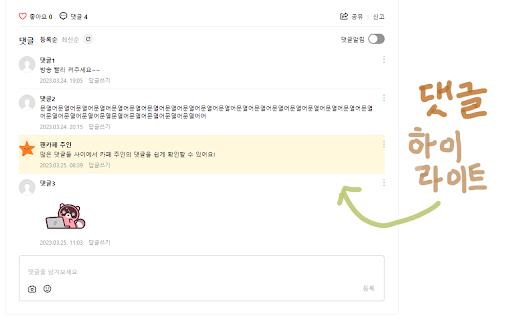
네이버 카페 주인이 댓글 또는 좋아요를 남긴 글을 표시합니다.
Time on the storeAbout 3 years or moreA rough range, not an exact date
Store users179As shown on the Chrome Web Store
Chrome Web Store ratingNot rated yetNo store ratings yet
Last store update1 May 2025Version 1.0.7, 17 months ago
Inside the extension
 Product image 1 of 5
Reviews
Loading reviews…
The maker
mauz has 3 listings on the store. Most of their listings haven’t changed in over a year.
- Listings
- 3
- Combined store users
- ≈210
- Store Featured
- 0
- Updated in the last 90 days
- 0 of 3
- Stopwatch for BOJ17 users · updated 3.7 years ago
- Twitch Magic Chat - 트위치 채팅 원클릭 복사14 users · updated 3.5 years ago


Combined users can count the same person more than once. See all 3 listings
Ext Watch AI
Should you build in this niche?
One research report for Naver cafe Marker - 팬카페를 위한 플러그인. Reports come with Plus, Pro and Max.
- Takeaway & demandCited takeaway and search volumes
- Traffic & domainPopularity rank, visits and authority
- Money & pricingPlans and prices from the maker’s site
- ReviewsComplaints and praise, quoted
- Competitors & ranksRank against the closest listings
- Build opportunityWhat to build and how to position it
- Every number shows its source and date
- Ready in a minute or two
- Report and PDF yours for 30 days