

★★★★★Daniel Manzour López Uviedo
Excelente herramienta, puedes hacer de todo
Summarize YouTube videos and turn transcripts into notes with AI. Generate captions, then translate, copy, or download subtitles.
by chvjbklnufhknln · 1 listing·notegpt.io
5 images from the publisher · use the arrows or pick one · swipe or pick one

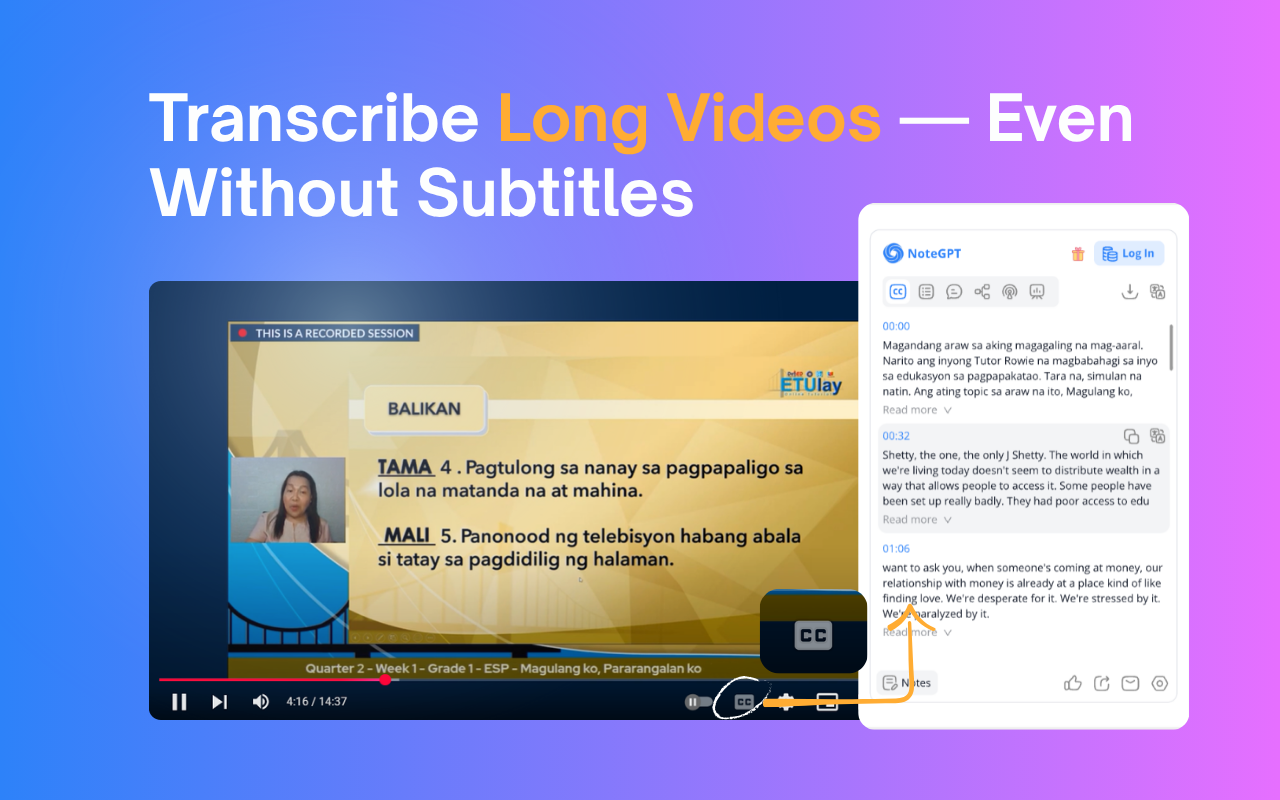


NoteGPT Extension is your all-in-one AI tool for YouTube summary, YouTube transcript, and content creation. Instantly extract, summarize, and translate video content—even without subtitles. Whether you want to summarize YouTube videos or generate accurate YouTube transcripts, NoteGPT Extension helps you learn faster and work smarter by turning videos into clear notes, mind maps, slides, and podcasts.
Key Features
✅ Instant YouTube Summary & Transcript
Get precise AI YouTube summary and transcripts in seconds—even for videos without captions.
✅ Transcribe Long Videos — Even Without Subtitles (Up to 2 Hours)
Easily transcribe and summarize YouTube videos with or without captions. For videos without subtitles, we support up to 2 hours in length. Just one click to get your full transcript and download it instantly.
✅ Free Subtitle Download
Easily download subtitles in multiple formats (TXT, SRT) for all your YouTube videos—free and fast.
✅ Translate YouTube Transcripts into 40+ Languages
Break language barriers with AI-powered translation of transcripts and summaries, perfect for global learners.
✅ AI Chat to Explore Video Content
Interact with your videos by asking questions, clarifying concepts, or diving deeper into topics using AI chat.
✅ Turn Notes into Mind Maps, Slides & Podcasts
Convert AI-generated notes into visual mind maps, ready-to-use presentations, or narrated podcasts with one click.
✅ Dark Mode & Browser Sync
Choose light, dark, or follow your browser’s theme for a seamless user experience.
✅ Prompt Library for Smarter AI Summary GenerationUse our built-in prompt library to get better AI summaries and explanations. Whether you're using NoteGPT as a YouTube video summarizer or exploring other content, these smart prompts help you get high-quality results—without typing prompts yourself.
✅ Custom Settings for YouTube Summary and AI OutputEasily customize your YouTube summary with options to set length, tone, or format. Whether you want a brief AI overview or a full in-depth YouTube video summary, NoteGPT adapts to your workflow and learning style.
FAQs
Q1: What is NoteGPT Extension?
A: NoteGPT Extension is an AI-powered Chrome extension that helps you summarize, transcribe, and repurpose YouTube videos, webpages, and PDFs. It turns long-form content into structured notes, mind maps, slides, or podcasts — all in one click.
Q: Is NoteGPT Extension free to use?
A: Yes! You get 15 free quotas per month with permanent storage. Upgrade anytime for unlimited use.
Q: Can I summarize videos without subtitles?
A: Yes. Even videos without captions are supported (up to 120 minutes). This requires 1 quota per 10 minutes.
Q2: How long of a video can NoteGPT Extension summarize or transcribe?
A: There’s no length limit for videos with subtitles — NoteGPT Extension can summarize and transcribe them regardless of duration. For videos without subtitles, the maximum supported length is 2 hours.
Q5: What else can I use NoteGPT Extension for?
A: Beyond YouTube, you can summarize webpages and PDF documents, translate transcripts into any languages, and generate visual mind maps, podcasts, and slide decks from your content.
Contact Us
Have questions, feedback, or need support? We’d love to hear from you.
Join our user group on Discord: https://discord.com/invite/wzNfuks8Qk
Or email us at support@notegpt.io
🐦 Twitter/X: @NoteGPT_AINote
Learn more: https://notegpt.io/
Excelente herramienta, puedes hacer de todo
???? just signing on ...ask for review to get 5 stars?????sooooo dont know yet!!!!
This page shows the listing as it is today. Add it to Radar and get one email when it changes.

What it is, what to use instead, what it can access and how to fix it.
NoteGPT: YouTube Summary, Chat with AI Assistant, ChatGPT DeepSeek Claude is a Tools extension by chvjbklnufhknln with 400K users. Chrome Web Store users rate it 4.97 out of 5 from 8,931 ratings. By users it sits in the top 1% of Tools extensions.
NoteGPT asks for 3 permissions and access to 3 site patterns. 2 of them give wide access.
Permissions show what it could do, not what it does. See the full permission list.
webRequestWatch the web traffic your browser sendsidentityAsk for your Google account sign-inhttps://*.youtube.com/*https://*.openai.com/*https://notegpt.io/*webRequestidentitystorageSensitive marks access that reaches your data or other sites. The access level is a 0 to 100 score of all of it: under 25 is Low, 60 and up is High.
Still stuck? Contact the maker or try an alternative.
Track any extension on Radar: users, rating, permissions and store text, with one email when something moves.


