

★★★★★March Ferrere
Amazing! Incredible! Outstanding! The best ever!
Convert PDF to OCR for free.
by freebusinessapps · 12 listings
2 images from the publisher · use the arrows or pick one · swipe or pick one
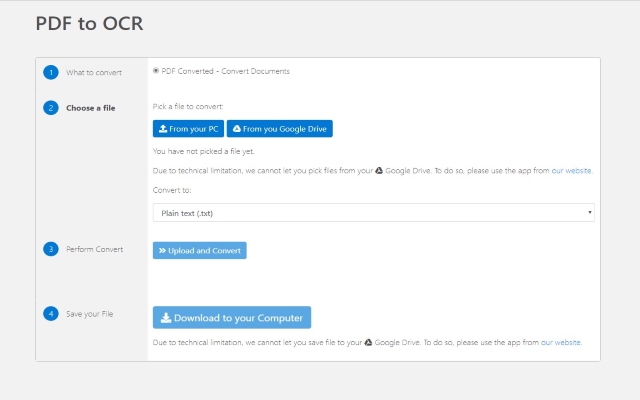

Convert your PDF files to OCR format today using our software PDF to OCR for Google Chrome™.
3 Step Process
1) Install the software PDF to OCR for Google Chrome™
2) Upload your PDF File
3) Download the OCR output file instantly
Our servers convert your PDF files within seconds. You can rest assured the conversion process is fast and nifty without any delays. Try converting PDF files to OCR now using PDF to OCR for Google Chrome™
Disclaimer: Please note this extension is NOT made by Google and is made by an independent development team. All copyrights belong to their respective owners.
Google doesn’t endorse or sponsor this Chrome extension. PDF to OCR for Google Chrome™ is not owned by, is not licensed by and is not a subsidiary of Google Inc.
Amazing! Incredible! Outstanding! The best ever!
After the conversion, the document downloaded is blank. Perhaps some basic testing of a scanned PDF type of document was missed?
Loaded PDF and received a blank document. Tell us what we are missing as some of the reviews state, "Great" and "Awesome" comments. Maybe better instructions or what might be failing if we get blank pages could help make this a better application. Waisted time, maybe, but what is working?
Complete garbage!! DO NOT USE!! THESE GOONS MUST BE STEALING YOUR DOCS since this app is completely worthless!
No use at all. All I get is an empty file.
Converted a pdf to a blank page dot txt. Complete waist of my time
This page shows the listing as it is today. Add it to Radar and get one email when it changes.

What it is, what to use instead, what it can access and how to fix it.
PDF to OCR for Google Chrome™ is a Workflow & Planning extension by freebusinessapps with 6,000 users. Chrome Web Store users rate it 2.24 out of 5 from 25 ratings. By users it sits in the top 10% of Workflow & Planning extensions.
PDF to OCR for Google Chrome™ asks for 0 permissions and access to 1 site pattern. None of them are on our list of wide-access permissions.
Permissions show what it could do, not what it does. See the full permission list.
https://api.pdfconverted.com/*Sensitive marks access that reaches your data or other sites. The access level is a 0 to 100 score of all of it: under 25 is Low, 60 and up is High.
No new reviews were posted in the last 90 days, so there are no fresh complaint signals.
Still stuck? Contact the maker or try an alternative.
Track any extension on Radar: users, rating, permissions and store text, with one email when something moves.


