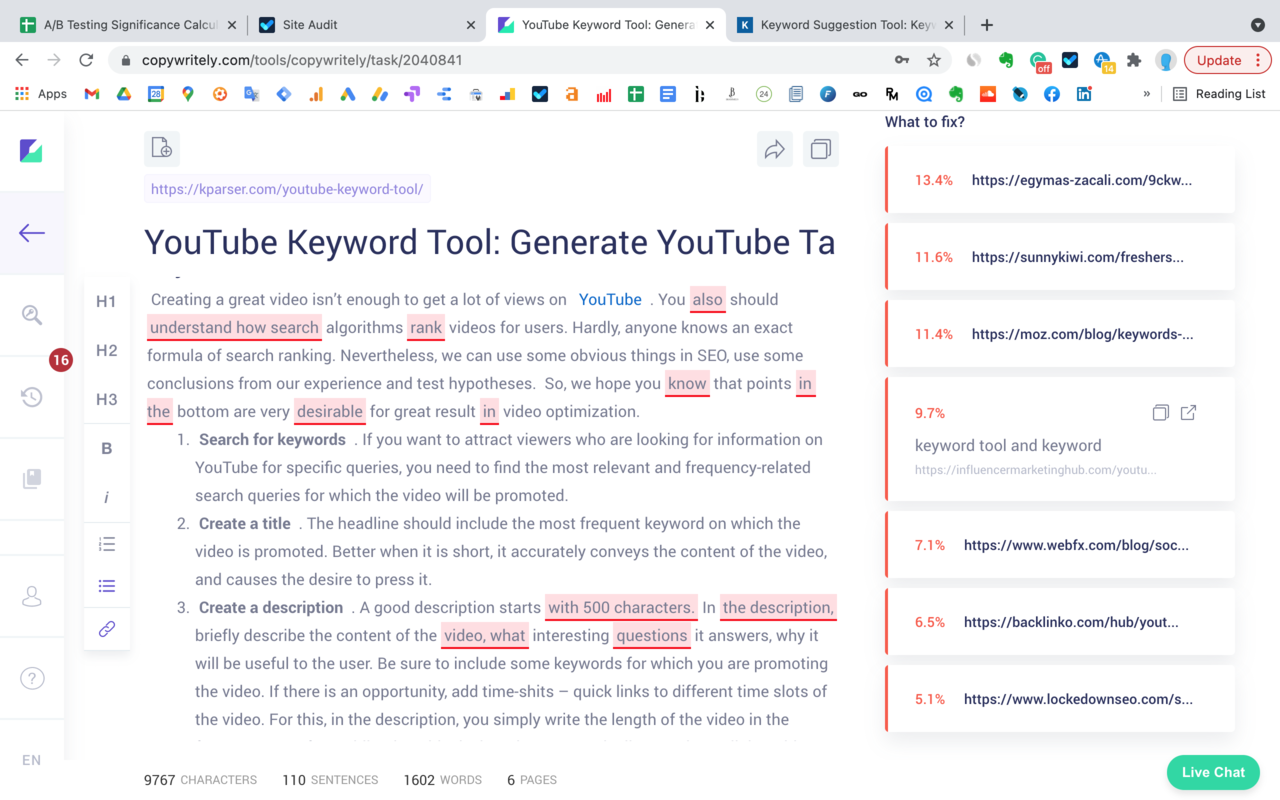
La prueba de 5 documentos de hasta 2500 palabras presenta datos muy completos e útiles. Parece ser muy bueno, pero 29 dólares mensuales por 50 documentos puede no ser una opción práctica y realista para muchos usos.
SEO Content Checker: Plagiarism & Readability
- 9,000+ users
- 3.3611 ratings
- #792in Developer Tools
Easy-to-use SEO content checker, that helps to check text for plagiarism, readability, relevance, keyword stuffing.
by Boosta Inc OÜ · 2 listings·copywritely.com
- Users
- 9,000+
- #792 of 31,800 in category
- Rating
- 3.36
- 11 ratings · median 4.64
- Version
- 1.5.5.1
- 14.01 KiB · Manifest V3
- Access
- Low2/100
- 1 permission
Description
As written by the publisher on the storeEasy-to-use SEO content checker, that helps to check text for plagiarism, readability, relevance, keyword stuffing.
1. Find duplicate content and plagiarism sources. Click on any source to highlight parts of the text which are duplicate. Immediately rewrite these parts if you need it.
2. Identify redundant phrases. Redundant phrases are useless filters that do not add any value to the text. Click on the collected phrases on the right to highlight them and rewrite or delete this words.
3. Detect keyword stuffing. Find the words that make your text spammy and stop words. Get suggestions how many times it is better to use each word in the text to avoid spam.
4. Check for what phrases your text is relevant. Relevant words are phrases by which your text can rank in SERP with high probability. Note that it is a forecast. There are a lot of ranking factors, except content factors.
5. Check how easy it is to read your content. Сontent readability can influence on bounce rate of the page, its conversion rate and finally position in SERP. Detect and fix problems with readability to help users find solutions they need faster and easier.
6. Find how to structure your sentences in a better way. It's better to alternate long and short sentences to make the content easy-to-read. Detect parts in the text without such rotation and fix it.
7. Check text for keywords. Most likely, you create a text that should be ranked by specific keywords. And it's important to check how good your content is optimized for such purpose. Paste or enter a list of keywords in the right table and you will get a report that will help to proof it.

Ratings and reviews
Split of the 5 written reviews we hold5 written reviews we hold
Never worked once. Just a way to increase sign-in into their website. Nothing much.
Track SEO Content Checker on Radar
This page shows the listing as it is today. Add it to Radar and get one email when it changes.
- Users and rating
- Store text and screenshots
- Permissions it asks for

SEO Content Checker, in plain words
What it is, what to use instead, what it can access and how to fix it.
SEO Content Checker at a glance
SEO Content Checker: Plagiarism & Readability is a Developer Tools extension by Boosta Inc OÜ with 9,000 users. Chrome Web Store users rate it 3.36 out of 5 from 11 ratings, which is still a small sample. By users it sits in the top 5% of Developer Tools extensions.
- By users
- #792of 31,800 in Developer Tools
- Rating
- 3.36category median 4.64
- Access
- Low2 of 100
SEO Content Checker alternatives
Closest by what they do · users as the store shows them · bars on a log scaleIs SEO Content Checker safe?
SEO Content Checker asks for 1 permission. None of them are on our list of wide-access permissions.
Permissions show what it could do, not what it does. See the full permission list.
activeTabNot on our wide-access list
Every permission SEO Content Checker asks for
1 permission · none sensitive · Low access overallBrowser permissions · 1
- Work on the tab you click it on
activeTab
Sensitive marks access that reaches your data or other sites. The access level is a 0 to 100 score of all of it: under 25 is Low, 60 and up is High.
SEO Content Checker not working?
What recent reviews say
Store reviews from the last 90 daysNo new reviews were posted in the last 90 days, so there are no fresh complaint signals.
Common fixes
Try them in this order- 1Update Chrome and the extension
- 2Turn it off and on in chrome://extensions
- 3Reload the page
- 4Turn other extensions off in case two clash
Still stuck? Contact the maker or try an alternative.
Know when a listing changes
Track any extension on Radar: users, rating, permissions and store text, with one email when something moves.