I wanted to try this app, and I installed the extension, but when signing into my gmail it's asking for too many permissions which seem unnecessary. I'm happy to provide read permissions, but I'm not sure why write and other permissions are needed for the described functionality of this app. This app wants permission to: Read your emails Compose new emails Send emails from any of your Gmail addresses See (but not ch…
Share emails via secure URL link by cloudHQ
- 10K+ users
- 4.4833 ratings
- #118in Communication
Share any email on Slack, Teams, chat, etc.
by cloudHQ LLC · 19 listings·email-links.com
- Users
- 10K+
- #118 of 7,999 in category
- Rating
- 4.48
- 33 ratings · median 4.69
- Version
- 1.0.1.9
- 646 KiB · Manifest V3
- Access
- Low22/100
- 3 permissions + 2 site patterns
Description
As written by the publisher on the storeThis is how to create a secure URL link for your email conversation.
Have you ever received an email that you were just dying to share with someone in a chat application? We all have, and now you can in just 1 click!
With Share emails via secure URL link by cloudHQ, you can create a shareable link for one of your emails. You can then paste it in any chat application.
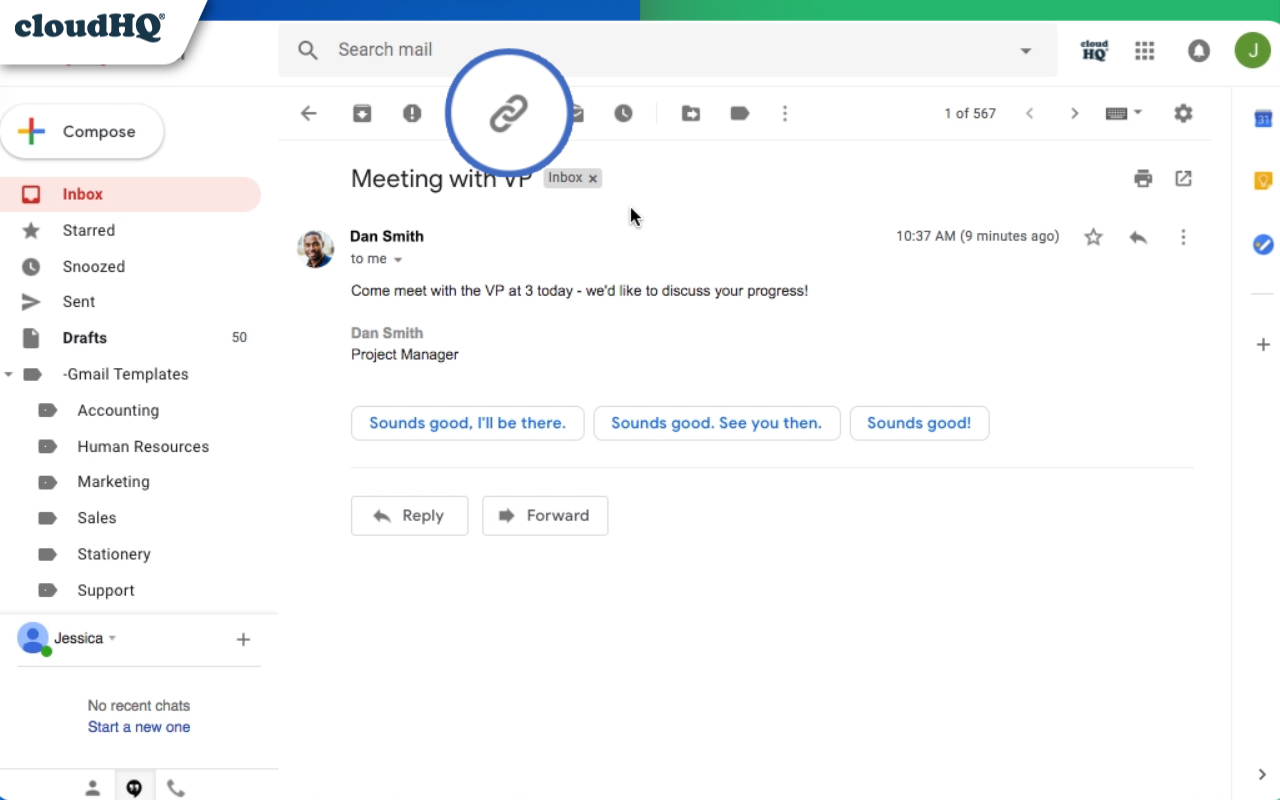
All you need to do is install the Chrome extension, click on the link icon 🔗 at the top of your email, copy the link to your clipboard, and paste it anywhere you want!
How it works
- Install the extension.
- Go to your Gmail™
- Select a message (or multiple messages).
- Click on the click on the link icon 🔗 and we will create a secure link you can share
For example, imagine you're part of a project team using Slack for communication and coordination. One day, you receive a critical project update via Gmail™, which you urgently need to share with your team members. Instead of forwarding the email individually or struggling with screenshots, you use the Share emails via secure URL link by cloudHQ. With a single click, you create a secure, shareable URL for the email and post it in your group chat, allowing your team to instantly access the important information.
Or envision yourself working on a project and communicating with a partner via Slack. Suddenly, you receive an email in your Gmail inbox containing key project information that needs to be shared promptly with your partner. In an earlier time, you may have had to forward the email or go through the tedious process of capturing and sending screenshots. But now, with the Share emails via secure URL link by cloudHQ, you've got a much more efficient tool at your fingertips. With just a single click, the email can be turned into a secure, sharable link. You then paste this link directly into your Slack conversation with your partner. In no time, they have access to the vital information contained in the email.
This extension not only streamlines your communication process but also ensures that your collaborations are as effective and productive as possible.
For mobile access please check our Google Workspace Add-on: https://workspace.google.com/marketplace/app/share_emails_via_url_link_by_cloudhq/842929301805
cloudHQ. Helping your productivity, 1 click at a time.
cloudHQ website: https://www.cloudhq.net/
App website: https://www.email-links.com
Pricing: https://www.email-links.com/pricing
Support page: https://support.cloudhq.net/category/browser-extensions/gmail-email-links/
Blog: https://blog.cloudhq.net
Gmail is trademark of Google LLC. Use of this trademark is subject to Google Permissions.
cloudHQ is trademark of CloudHQ LLC. https://www.cloudhq.net/trademark

Ratings and reviews
Split of the 21 written reviews we hold21 written reviews we hold
Simple extension. I use it to share emails on Skype chat and on Viber.
Love it! It's a powerful tool that makes it easy for me to share my Gmail messages with others via a secure link. The ability to control access to these emails, set expiration dates, and revoke access at any time make it a great choice for me who needs to share sensitive information securely.
This extension earns five stars for its simplicity and innovation. It is making email sharing effortless and secure.
Unfortunately, it shows all the BCC emails, making it unusable for WhatsApp sharing.
Does NOT work. No link is generated. A great idea though.
Track Share emails via secure URL link by on Radar
This page shows the listing as it is today. Add it to Radar and get one email when it changes.
- Users and rating
- Store text and screenshots
- Permissions it asks for

Share emails via secure URL link by cloudHQ, in plain words
What it is, what to use instead, what it can access and how to fix it.
Share emails via secure URL link by cloudHQ at a glance
Share emails via secure URL link by cloudHQ is a Communication extension by cloudHQ LLC with 10K users. Chrome Web Store users rate it 4.48 out of 5 from 33 ratings. By users it sits in the top 5% of Communication extensions.
- By users
- #118of 7,999 in Communication
- Rating
- 4.48category median 4.69
- Access
- Low22 of 100
Share emails via secure URL link by cloudHQ alternatives
Closest by what they do · users as the store shows themIs Share emails via secure URL link by cloudHQ safe?
Share emails via secure URL link by cloudHQ asks for 3 permissions and access to 2 site patterns. None of them are on our list of wide-access permissions.
Permissions show what it could do, not what it does. See the full permission list.
scriptingNot on our wide-access liststorageNot on our wide-access listbackgroundNot on our wide-access list
Every permission Share emails via secure URL link by cloudHQ asks for
3 permissions + 2 site patterns · none sensitive · Low access overallSites
- Read and change data on matching sites
https://mail.google.com/ - Read and change data on matching sites
https://www.cloudhq.net/
Browser permissions · 3
- Run its code on pages it can access
scripting - Save its own settings
storage - Keep running in the background
background
Sensitive marks access that reaches your data or other sites. The access level is a 0 to 100 score of all of it: under 25 is Low, 60 and up is High.
Share emails via secure URL link by cloudHQ not working?
What recent reviews say
Store reviews from the last 90 daysNo new reviews were posted in the last 90 days, so there are no fresh complaint signals.
Common fixes
Try them in this order- 1Update Chrome and the extension
- 2Turn it off and on in chrome://extensions
- 3Reload the page
- 4Turn other extensions off in case two clash
Still stuck? Contact the maker or try an alternative.
Know when a listing changes
Track any extension on Radar: users, rating, permissions and store text, with one email when something moves.