

★★★★★Boss Ox
This is great! Wish to have the ability to use different search engines with different keyboard shortcut.
Add shortcut keys to open a new google result tab for selected text. Shortcut keys can be set in above left menu in Extensions.
by nex · 4 listings
4 images from the publisher · use the arrows or pick one · swipe or pick one
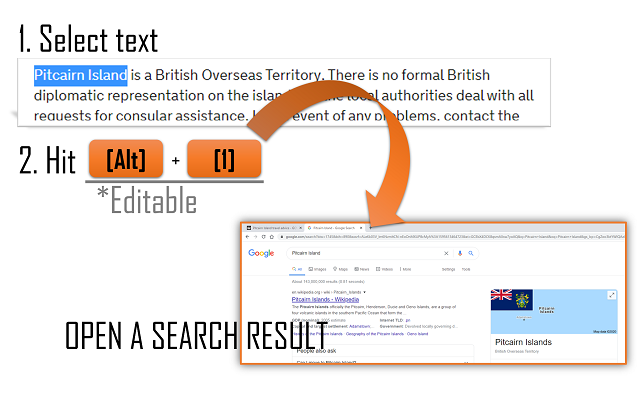


**For Chromebook users** (maybe also Mac OS users)
The Alt+1 key will click the first icon in the Shelf, and it will not work on Chrome browser.
After the installation, please change the shortcut key from "Alt+1" to another one at chrome://extensions/shortcuts then avoid the built-in shortcut keys on your OS.
In the setting page, the right box should be "In Chrome".
(Input chrome://extensions/shortcuts in the address bar and press Enter to open a setting page.)
*Updates
2024/9/10 v0.400 Update manifest to V3 and minor bugfix.
2022/9/27 v0.201 (=v0.2)
2022/9/20 v0.3 Add feature to search text selected in a single PDF (in chrome's default PDF viewer)
2022/7/10 v0.2 Add feature to search by the default search engine.
2021/6/7 v0.1.0.1 Initial
This is great! Wish to have the ability to use different search engines with different keyboard shortcut.
Thank you so much, I tried about a dozen similar apps — this is the only one that’s adequate, simple, and actually works.
This page shows the listing as it is today. Add it to Radar and get one email when it changes.

What it is, what to use instead, what it can access and how to fix it.
Shortcut keys for selection search is a Workflow & Planning extension by nex with 4,000 users. Chrome Web Store users rate it 4.85 out of 5 from 26 ratings. By users it sits in the top 10% of Workflow & Planning extensions.
Shortcut keys for selection search asks for 3 permissions. None of them are on our list of wide-access permissions.
Permissions show what it could do, not what it does. See the full permission list.
activeTabNot on our wide-access listsearchNot on our wide-access listscriptingNot on our wide-access listactiveTabsearchscriptingSensitive marks access that reaches your data or other sites. The access level is a 0 to 100 score of all of it: under 25 is Low, 60 and up is High.
No new reviews were posted in the last 90 days, so there are no fresh complaint signals.
Still stuck? Contact the maker or try an alternative.
Track any extension on Radar: users, rating, permissions and store text, with one email when something moves.


