Skip to content
Ask Claude about any Chrome extension, answered with Ext Watch data. See how →
Workflow & Planning extension

Sticky Notes 3.8 - Super Quick & Personal

Animated Themes, Fonts, Offline, Backup, 1-Click easiest & fastest note taking app inside browser. (See demo)

by Ukiv · 1 listing

Add to RadarChrome Web Store Free plan tracks 1 extension · no card
extwatch.com/extensions/sticky-notes-38-super-quick-personal-plpdjbappofmfbgdmhoaabefbobddchk
Sticky Notes 3.8Ukiv · Workflow & PlanningLow access
Users
100K+
#468 of 51,924 in category
Rating
3.97
4,084 ratings · median 4.38
Version
3.8
3.54 MiB · Manifest V3
Access
Low6/100
3 permissions
From the store listing

Screenshots

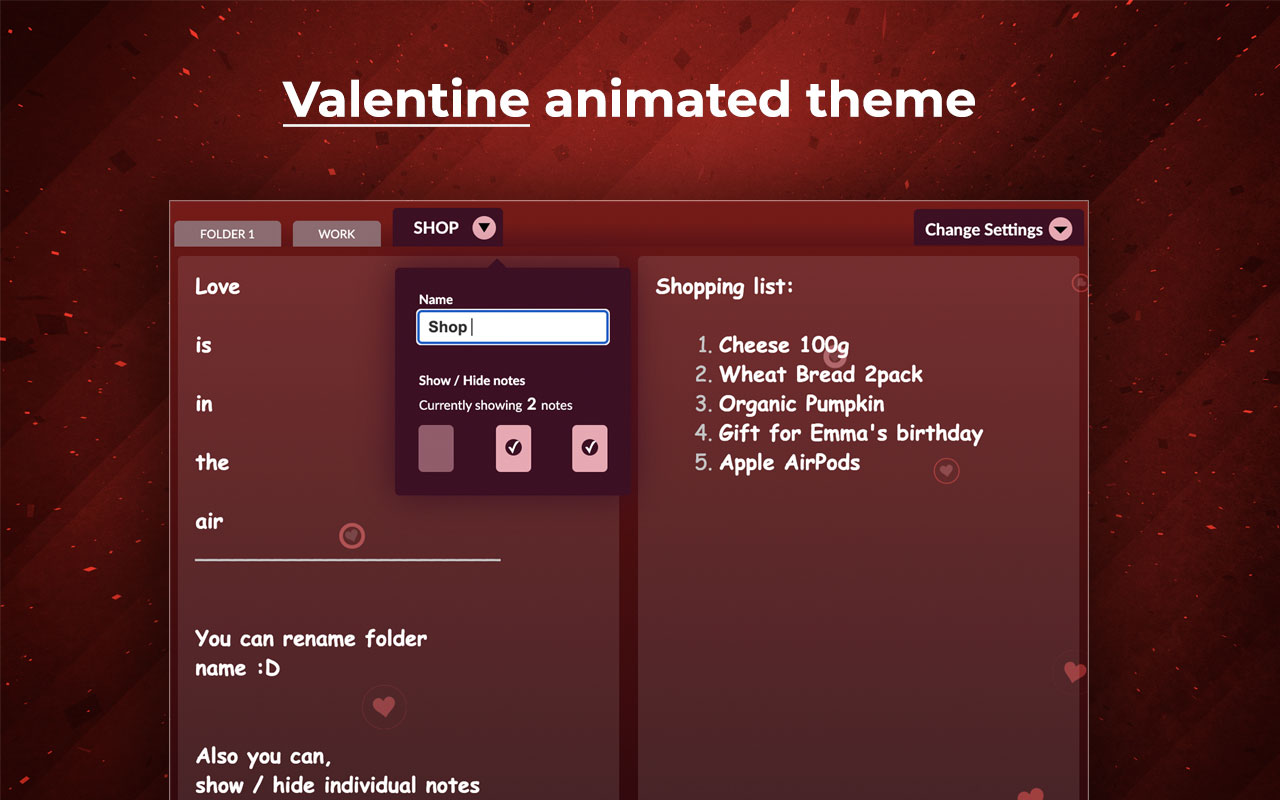
5 images from the publisher · use the arrows or pick one · swipe or pick one

Sticky Notes 3.8 - Super Quick & Personal screenshot 1Sticky Notes 3.8 - Super Quick & Personal screenshot 2Sticky Notes 3.8 - Super Quick & Personal screenshot 3Sticky Notes 3.8 - Super Quick & Personal screenshot 4Sticky Notes 3.8 - Super Quick & Personal screenshot 5
1 / 5

Description

As written by the publisher on the store

Capture your thoughts instantly without breaking your focus. Sticky Notes is the super-fast, 1-click browser memo pad trusted by over 100,000 active users worldwide.

🏆 OFFICIALLY FEATURED BY GOOGLE CHROME
Recognized for adhering to Chrome Web Store recommended best practices, exceptional performance, and a proven 15-year pedigree.

⚡ WHY 100,000+ PEOPLE RELY ON STICKY NOTES

  • Instant 1-Click Access: No waiting, no loading screens, no heavy background processes. Click the icon in your toolbar and start typing immediately.
  • 100% Private & Local: Your notes belong to you. Everything is stored directly in your local browser storage—never sent to external servers, never analyzed, and never monetized.
  • Zero Account Friction: Start typing the second you install. No passwords, no mandatory sign-ups, and no mandatory setup wizards.
  • Distraction-Free Workspace: A clean, uncluttered interface that gives you the classic feel of sticky notes without covering your physical desk.

✨ CORE FEATURES

📝 Effortless Note-Taking:

Instant pop-up memo pad right in your Chrome toolbar
Rich text formatting: Bold, Italic, Underline, and Strikethrough

Text styling with highlighters and customizable font colors

Bulleted lists to easily track daily action items and checklists

🗂 Smart Management:

Switch seamlessly between multiple notes
Organize thoughts with customizable colored sticky notes

Clean layout designed for quick skimming and rapid capture

🔒 Privacy First by Design:

Works completely offline—no internet connection required
No third-party ad networks

💡 PRO TIPS FOR THE BEST EXPERIENCE

Pin for 1-Click Access: Click the puzzle piece icon (🧩) in your Chrome toolbar and click the pin icon (📌) next to Sticky Notes so it's always one click away.
Local Storage Awareness: Because Sticky Notes is strictly private and stored locally on your machine, your data stays on this device. When managing browser data, keep your local extension storage preserved to retain all your notes.

Quick Keyboard Exit: Hit Esc or click outside the note anytime to quickly dismiss the popup while keeping your edits safely saved.

🎯 IDEAL FOR:

Quick Scratches: Phone numbers, addresses, verification codes, and temporary links.
Meeting Notes: Fast bullet points during video calls and webinars.

Daily Reminders: Today’s priority to-do list kept right at your fingertips.

Writers & Researchers: Draft snippets, quotes, and research ideas without switching apps.

💬 FREQUENTLY ASKED QUESTIONS

Q: Do I need to create an account?
A: No! You can start taking notes immediately upon installation.

Q: Does it work offline?
A: Yes, 100%. Sticky Notes runs entirely within your browser and does not require an active internet connection.

Q: Where are my notes stored?
A: All notes are saved locally in your Chrome browser profile on your own computer. We never store or upload your notes to external servers.

Thank you for supporting Sticky Notes! We are actively committed to delivering a fast, private, and dependable note-taking utility.

Ratings and reviews

Split of the 552 written reviews we hold
Reviews on the store
3.974,084 ratings on the store
552 written reviews we hold
5 ★57.1%315
4 ★12.0%66
3 ★8.0%44
2 ★6.3%35
1 ★16.7%92
Amanda lauman

ALL MY NOTES GOT ERASED - YEARS OF IMPORTANT NOTES AND I HAVE BEEN ATTEMPTING TO CONTACT SUPPORT FOR DAYS WITH NO RESPONSE. THESE NOTES ARE CRITICAL TO MY BUSINESS. I NEED SOMEONE TO EFFIN HELP ME NOW!!!!!!! I'M BEYOND PISSED AT THE LACK OF SUPPORT THIS COMPANY HAS.

Radar

Track Sticky Notes 3.8 on Radar

This page shows the listing as it is today. Add it to Radar and get one email when it changes.

  • Users and rating
  • Store text and screenshots
  • Permissions it asks for
Free plan tracks 1 extension · no card
Ext Watch Radar watchlist cards showing tracked extensions with users, rating, version and latest store change
Guide

Sticky Notes 3.8, in plain words

What it is, what to use instead, what it can access and how to fix it.

At a glance

Sticky Notes 3.8 at a glance

Sticky Notes 3.8 - Super Quick & Personal is a Workflow & Planning extension by Ukiv with 100K users. Chrome Web Store users rate it 3.97 out of 5 from 4,084 ratings. By users it sits in the top 1% of Workflow & Planning extensions.

By users
#468of 51,924 in Workflow & Planning
Rating
3.97category median 4.38
Access
Low6 of 100

Sticky Notes 3.8 alternatives

Closest by what they do · users as the store shows them · bars on a log scale
Sticky Notes 3.8100K3.97 ★
Note Board - Sticky Notes App200K4.8 ★Note Anywhere100K3.0 ★Anywhere stickers - simple sticky notes20K4.2 ★Web Sticky Notes6K3.7 ★Swifty Sticky Note3K4.6 ★
Permissions

Is Sticky Notes 3.8 safe?

Sticky Notes 3.8 asks for 3 permissions. One of them gives wide access.

Permissions show what it could do, not what it does. See the full permission list.

6/ 100Low access
Sticky Notes 3.83 permissions · 1 wide
  • identityAsk for your Google account sign-in

Every permission Sticky Notes 3.8 asks for

3 permissions · 1 sensitive · Low access overall

Browser permissions · 3

  • Ask for your Google account sign-inidentity
  • Save its own settingsstorage
  • See your display detailssystem.display

Sensitive marks access that reaches your data or other sites. The access level is a 0 to 100 score of all of it: under 25 is Low, 60 and up is High.

Troubleshooting

Sticky Notes 3.8 not working?

What recent reviews say

Store reviews from the last 90 days

No new reviews were posted in the last 90 days, so there are no fresh complaint signals.

Common fixes

Try them in this order
  1. 1Update Chrome and the extension
  2. 2Turn it off and on in chrome://extensions
  3. 3Reload the page
  4. 4Turn other extensions off in case two clash

Still stuck? Contact the maker or try an alternative.

310K Chrome extensions in one place

Know when a listing changes

Track any extension on Radar: users, rating, permissions and store text, with one email when something moves.

No credit card neededFree planAsk Claude on Pro