pros: • the bezier curve tool is a good novelty, although it doesn't work the same way as in Photoshop. cons: • it's not possible to reselect the text box and re-write the text; • shapes and text don't have separate size adjusters, so if you switch from one to the other, you have to change the size again and again, which is time consuming during online classes.
Web Paint Tool - draw online
- 100K+ users
- 4.414,974 ratings
- #32in Just for Fun
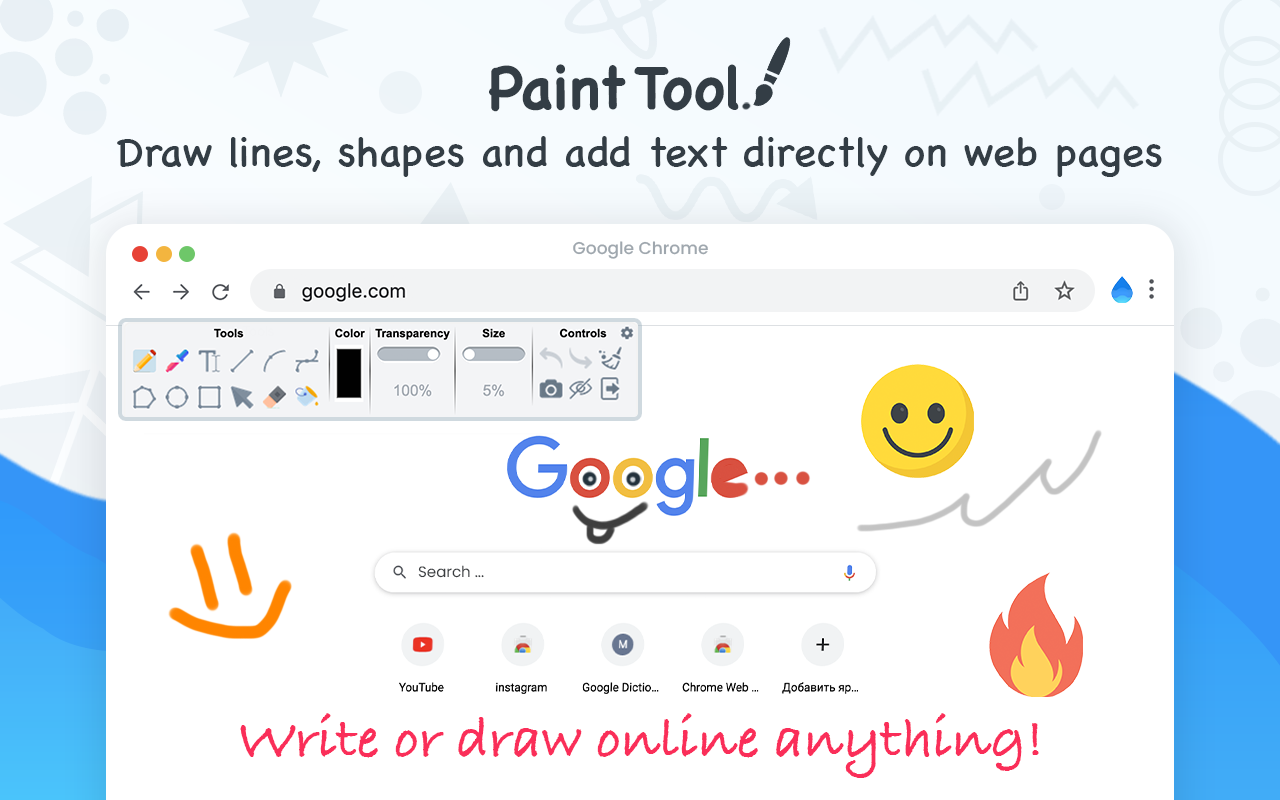
Draw rectangle, circle, lines and others shapes or add text on any web pages, then make screenshot the result.
by Draw Online · 1 listing·web-draws.com
- Users
- 100K+
- #32 of 8,648 in category
- Rating
- 4.41
- 4,974 ratings · median 4.44
- Version
- 1.0.9
- 198 KiB · Manifest V3
- Access
- Medium41/100
- 3 permissions + every website
Description
As written by the publisher on the storeWeb Paint Tool is absolutely free lightweight digital program to created various drawing that comes loaded with brushes, fonts, shapes, and other resources.
Our Paint Tool extension has a simple and easy to use design. It is not confusing and easily recognisable tool icons (pencil, paint bucket, eraser and others tool) are used in the app which makes it easy for everyone to use.
Paint online or add information on a webpage to highlight moments, then take a screenshot of a full webpage or just a selected area with an option to download or share it. Fully customized screenshot that could be printed, saved or sent instantly.
- It contains the tools you need:
- Pencil tool - draw custom lines
- Text tool - add annotation
- Emoji - add fine emoji on any web pages
- Bucket fill tool - fill shapes and drawn with any color from palette
- Line tool - put start and end point to paint straight line
- Quadratic curve - draw a quadratic curve with the selected line width
- Bezier curve - paint a bezier curve with the selected line width
- Polygon tool - paint a polygon with the selected line width
- Ellipse tool - draw an ellipse or a circle with the selected line width
- Eyedropper tool - pick a color from the web page or your drawings
- Screenshot tool - screenshot maker allows saving result in PN or JPG
All tools as in MS Paint but only in your browser.
You can mark shapes with the magic marker, write with the text tool and more. After you are done. Take screenshot of your work so that your friends can see your creativity as well. You can share your images on Pinterest board.
Want to share your screen for cases like reporting technical issues, making product demos or how-to tutorials? Here are reasons to choose Paint and Screenshot Tool:
- Hot-keys to each tool
- Current drawings are automatically saved
- Save drawing with a Screenshot option ( take a screenshot of a full page or capture selected area.) Screen capture.
- Download image to your PC or Print
- Crop the necessary area of an image and save it
Annotate on any webpage and save it as a screenshot! Annotate the Web was created to allow users to annotate any webpage and save it as an image. Page Marker for Chrome
Important
After installation / update Paint Tool, please reload the active tabs in your browser for the extension to work.
Paint on web and Screenshot Tool in simple manner and without any difficulties. Draw online with our new and absolutely free extension for chrome browser.
Known as a web paint or paint online tool extension is a useful have for students, teammates and everyone who works with websites content, as you could easily learn or save information, create custom tutorials or paper notes, if you’d decided to print it.
Please rate our Paint Tool extension if you like it. Happy painting everyone.

Ratings and reviews
Split of the 2,865 written reviews we hold2,865 written reviews we hold
bom demais, exatamente como eu procurava
Good except until recently...There's a suspicious pop up stating that "Git Hub" was updated??
the best one, because it has an option to use the curser and react with the page while still seeing the markers. good job thanks
Completely messes up formatting of multiple websites. https://minecraft.wiki/w/Tick to be specific about one of them.
Adware for "Sound Booster and Vocal Remover"
Track Web Paint Tool on Radar
This page shows the listing as it is today. Add it to Radar and get one email when it changes.
- Users and rating
- Store text and screenshots
- Permissions it asks for

Web Paint Tool, in plain words
What it is, what to use instead, what it can access and how to fix it.
Web Paint Tool at a glance
Web Paint Tool - draw online is a Just for Fun extension by Draw Online with 100K users. Chrome Web Store users rate it 4.41 out of 5 from 4,974 ratings. By users it sits in the top 1% of Just for Fun extensions.
- By users
- #32of 8,648 in Just for Fun
- Rating
- 4.41category median 4.44
- Access
- Medium41 of 100
Web Paint Tool alternatives
Closest by what they do · users as the store shows themIs Web Paint Tool safe?
Web Paint Tool asks for 3 permissions and access to every website. One of them gives wide access.
Permissions show what it could do, not what it does. See the full permission list.
<all_urls>Read and change data on every website
Every permission Web Paint Tool asks for
3 permissions + every website · 1 sensitive · Medium access overallSites
- Read and change data on every website
<all_urls>
Browser permissions · 3
- Run tasks on a schedule
alarms - Run its code on pages it can access
scripting - Save its own settings
storage
Sensitive marks access that reaches your data or other sites. The access level is a 0 to 100 score of all of it: under 25 is Low, 60 and up is High.
Web Paint Tool not working?
What recent reviews say
Store reviews from the last 90 days2 starsCool conceptually but didnt work
1 starCompletely messes up formatting of multiple websites. https://minecraft.wiki/w/Tick to be specific about one of them.
Common fixes
Try them in this order- 1Update Chrome and the extension
- 2Turn it off and on in chrome://extensions
- 3Reload the page
- 4Turn other extensions off in case two clash
Still stuck? Contact the maker or try an alternative.
Know when a listing changes
Track any extension on Radar: users, rating, permissions and store text, with one email when something moves.